



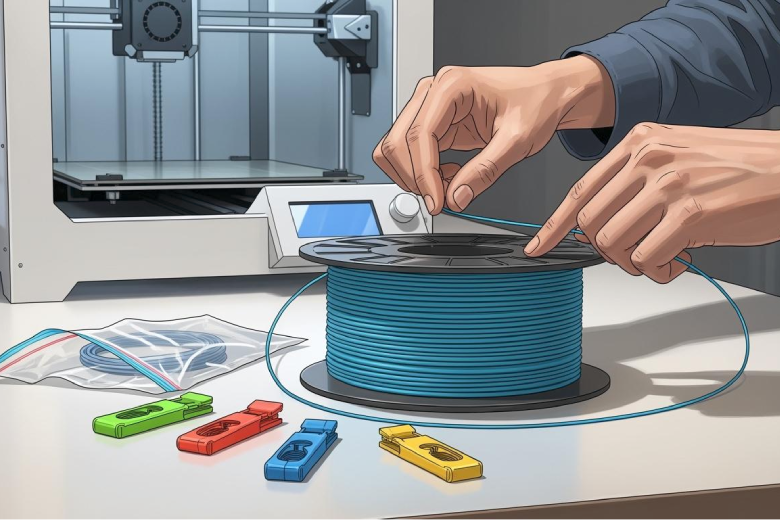
Never let go of the filament end and always secure it to the spool to prevent tangling. Using clips or holders keeps the filament in place on the spool. Studies show that tangling leads to uneven feeding, nozzle clogging, and longer printing times. Organized spools and tight gaps help Prevent Tangling and protect your 3d printer filament.
Key Takeaways
- Always secure the filament end to the spool to prevent tangling. Use clips or thread it through spool holes for best results.
- Store spools upright to keep filament tight against the spool wall. This prevents loose filament from slipping off and makes loading easier.
- Regularly check your filament for tangles and rewind any loose strands. This habit helps maintain smooth printing and avoids jams.
Prevent Tangling with Proper Handling
Secure Filament Ends
Handling 3d printer filament with care is the first step to prevent tangling. Many users experience problems when they let the filament end hang loose. This mistake can cause the filament to loop around the spool and create knots. Always keep the filament end in your hand during any movement or change. When removing filament from packaging, guide it directly into the filament path or secure it to the spool.
Tip: Never leave the filament end unsecured. This simple habit can prevent tangling and save time during printing.
There are several proven ways to secure the filament end:
- Thread the filament through the holes or slots on the spool.
- Use filament clips to lock the end in place.
- Fix the filament end immediately after removing it from the printer.
- Avoid letting the filament end dangle or touch other surfaces.
These methods help prevent tangling and keep the spool organized. Filament clips and spool holes are easy to use and provide reliable security. Organized spools make loading and unloading filament smoother and reduce the risk of knots.
Avoid Unwinding
Unwinding is another common cause of tangling. When filament unravels from the spool, it can loop and twist, making it difficult to feed into the printer. To prevent unraveling, follow these steps:
- During shipping, manufacturers attach the tip of the filament to the spool head with tape. Remove the tape carefully before operation.
- After each use, re-tape the filament tip or thread it through the spool eyelet.
- Store the spool upright to prevent loose filament from slipping off.
- Use filament clips or holders to keep the filament tight against the spool wall.
These steps help prevent tangling and keep the filament ready for printing. Proper handling and storage prevent filament from getting caught or tangled. Always check the spool for gaps and make sure the filament is secure.
Note: Prevent tangling by making these steps part of your routine. Consistent habits keep your filament organized and ready for every printing project.
Storage Solutions
Use Clips and Holders
Filament clips and holders help keep filament organized and prevent tangling. Many users rely on accessories to secure the filament end and avoid loose strands. Some clips stay attached to the filament, making storage easier. Here are a few popular options:
- Grandma's Favorite Filament Clip: This clip stays on the filament and does not need to attach to the spool. It is practical and easy to use.
- K2-Clips: These clips have a compact design. They remain on the filament during printing and keep it from slipping.
- Dragon Clip: This clip works best with PETG filament. It provides a strong hold and keeps the filament secure.
Printed accessories also help manage filament. Clips and holders reduce the risk of tangling and keep the spool neat.
Tip: Use clips to lock the filament end after every use. This habit keeps the spool tidy and ready for the next project.
Upright Spool Storage
Storing spools upright protects filament from slipping and tangling. Upright storage keeps the filament tight against the spool wall. It also prevents gaps between the refill and the spool. Many users place spools on racks or shelves. This method keeps filament accessible and organized.
- Upright storage stops loose filament from falling off the spool.
- It makes loading filament into the printer easier.
- Spools stay clean and free from dust.
Dry Containers
Filament needs protection from moisture. Dry containers keep filament safe and ready for printing. Many users store spools in airtight boxes or bags. Silica gel packs absorb moisture and protect filament quality. Dry storage prevents tangling and keeps filament strong.
Note: Store filament in dry containers to avoid damage and tangling. This step helps maintain reliable printing results.
Loading and Unloading
Careful Feeding
Feeding filament into your 3D printer requires attention to detail. Many users experience issues when they do not guide the filament directly into the extruder. Tight bends can cause jams and make the filament difficult to load. Always keep the Bowden tube as short as possible. This helps the filament move smoothly from the spool to the extruder. Start with a slow printing speed, such as 20 mm/s, to prevent jams and blockages. Minimize retraction settings to avoid twisting and tangling.
Tip: Hold the filament end firmly and feed it straight from the spool. Avoid letting the filament loop or twist during loading.
Some users report that improper handling of the Qidi Box leads to complications. Disconnecting the hub and loading the filament externally can help avoid problems. Forgetting to unload the filament externally may cause significant issues. Always follow the correct procedures to keep the filament organized and prevent tangling.
Retract and Secure After Use
After printing, retract the filament from the extruder. This step prevents the filament from sticking or breaking. Secure the filament end to the spool immediately. Use clips or thread the filament through the spool holes. This keeps the spool tidy and ready for the next printing session.
- Retracting the filament reduces the risk of knots.
- Securing the filament end prevents loose strands from slipping off the spool.
- Organized spools make future loading easier.
Note: Consistent habits during loading and unloading protect your filament and improve printing results.
Maintenance Checks
Inspect for Tangles
Checking your filament regularly helps prevent tangling and keeps your 3D printer running smoothly. After untangling the filament, inspect it again to make sure no further tangles are present. This habit reduces the risk of knots and feeding problems. Many users find that frequent checks catch issues early and save time during printing.
- Examine the filament after each use.
- Look for loops or twists on the spool.
- Check the path from the spool to the extruder.
- Repeat the inspection after untangling the filament.
Tip: Regular checks help you spot problems before they affect your print. Early detection keeps your filament ready for every project.
Rewind Loose Filament
Loose filament can slip off the spool and cause jams. Rewinding the filament keeps it tight and organized. If you notice slack or loops, wind the filament back onto the spool by hand. Make sure the filament sits close to the spool wall. Secure the end with a clip or thread it through the spool holes.
|
Maintenance Task |
Reason for Maintenance |
Frequency |
|---|---|---|
|
Clean guide rails and rods |
Dust and debris can hinder the movement of the print head and bed, leading to errors. |
Once a week |
|
Check and clean print bed |
A clean surface is crucial for first layer adhesion; residues can affect this. |
After each print, at least weekly |
|
Check tension of belts |
Loose belts can cause inaccurate movements and layer shifts. |
Once a week or after heavy use |
Regular maintenance improves print quality and extends the lifespan of your 3D printer. It helps you detect and resolve issues early. Keeping your filament and spool organized prevents tangling and ensures reliable results.
Accessories to Prevent Tangling
Filament Clips
Filament clips help keep the filament end secure and prevent tangling. Many clips are designed for specific filament types. Some clips work best with PETG, while others are universal. Users often prefer clips that are easy to use and durable. The Dragon Clip holds PETG filament tightly, but it does not perform well with PLA. Grandma's Favorite Filament Clip is popular for its simple design and convenience. Community members recommend several clips for everyday use.
- Smaller Universal Filament Clip by zxsix
- Ultimate Filament Clip Clamp by jajaum3d
Filament clips make it easier to keep the filament organized on the spool. They reduce the risk of loose ends and knots.
Storage Boxes
Storage boxes protect filament from dust and moisture. Many boxes are airtight and include silica gel packs. These boxes keep the filament dry and ready for printing. Storing filament in a box prevents tangling and damage. Some boxes have built-in guides that help feed the filament smoothly. Organized storage keeps the spool clean and makes it easier to find the right filament for each project.
Tip: Use storage boxes with guides to keep filament safe and tangle-free.
Filament Guides
Filament guides direct the filament from the spool to the printer. Guides help prevent loops and twists. Many guides are simple plastic parts that attach to the printer or storage box. Some guides are automatic and use motors to wind the filament. Experts recommend automatic winders for professional use. Compact winders are easy to use and fit in small spaces.
|
Type |
Description |
|---|---|
|
Uses an electric motor for precise winding, adjusts speed automatically, ideal for professional use. |
|
|
Compact Winder |
Small and portable, robust metal components, easy to use for beginners, suitable for limited spaces. |
Filament guides keep the filament moving smoothly and reduce tangling. Using a guide improves the reliability of your 3D printer.
Keeping filament tangle-free starts with simple habits.
- Secure filament ends and use clips for organization.
- Store spools upright and check them often.
- Choose quality filament and avoid brittle materials.
- Preventing tangles saves time, avoids jams, and leads to smoother, frustration-free 3D printing.
FAQ
How do I untangle filament if it gets knotted?
Hold the spool steady. Gently unwind the filament. Untangle filament by slowly looping it back onto the spool. Secure the end to prevent future knots.
What is the best way to store filament?
Store filament upright in dry containers. Use clips to secure the ends. Keep spools away from moisture and dust for best results.
Can I use any clip for all filament types?
Some clips work better with specific materials. Test different clips to find one that fits your filament and spool size.
