








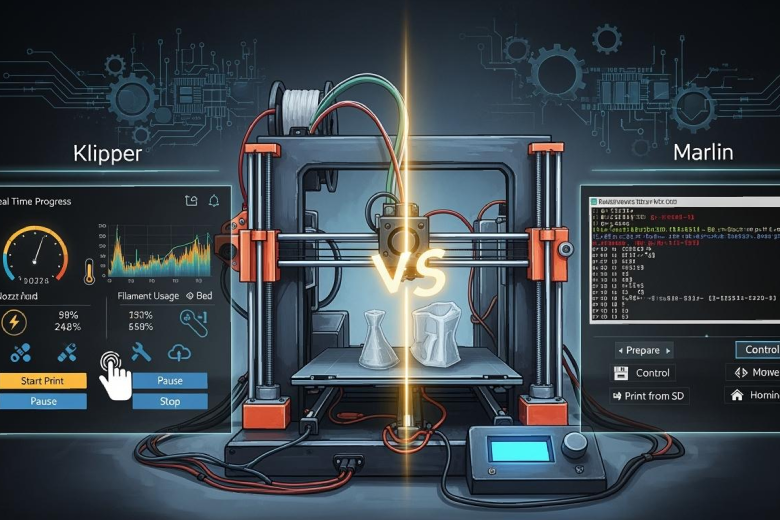
Klipper VS Marlin 3D print shows clear differences in speed, quality, and user experience. Klipper can reach speeds up to 500 mm/s and offers high print quality through input shaping. Marlin provides reliable accuracy and is known for simple operation. The table below highlights these key differences:
|
Feature |
Klipper |
Marlin |
|---|---|---|
|
Print Speed |
Capable of 500 mm/s and up |
Limited by main controller speed |
|
Print Quality |
High quality due to input shaping |
Reliable and accurate |
|
User Satisfaction |
Highly customizable with GUIs |
Known for ease of use |
These factors help users choose firmware that best fits their needs.
Key Takeaways
- Klipper offers high-speed printing up to 500 mm/s, making it ideal for users seeking advanced performance.
- Marlin is known for its reliability and ease of use, making it a great choice for beginners and standard printing tasks.
- Klipper allows for extensive customization through a simple configuration file, appealing to experienced users who want to optimize their printers.
- Marlin supports a wide range of printers and has a large community, providing extensive documentation and support for users.
- Choosing between Klipper and Marlin depends on your printing needs; Klipper excels in speed and features, while Marlin focuses on stability and simplicity.
Klipper vs Marlin 3D Print: Overview
What is Marlin Firmware
Marlin firmware stands as one of the most popular choices for 3D printers. Developers maintain a continuous development branch and release updates regularly. Marlin firmware operates directly on the printer’s mainboard, which gives it stability and versatility. Users often choose marlin for its reliability and straightforward installation. The process involves flashing the firmware onto the microcontroller, making it accessible for beginners and experienced users alike. Marlin supports a wide range of printers and hardware, which makes it ideal for multi-function and standard printing tasks. The community around marlin firmware remains active, providing frequent updates and support.
What is Klipper Firmware
Klipper firmware takes a different approach in the klipper vs marlin 3d print debate. Klipper offloads processing to a secondary CPU, usually a Raspberry Pi, which enables higher stepping rates and advanced features. This design allows klipper to achieve speeds over 500 mm/s and implement features like Input Shaping and Pressure Advance. Klipper firmware uses a simple configuration system, letting users change settings by editing a file on the host computer. The installation process for klipper requires more steps, including setting up a host device and flashing the microcontroller. Klipper excels in high-speed and advanced printing, making it a strong choice for users who want maximum performance.
Tip: Klipper vs marlin 3d print setups differ in installation complexity. Marlin offers plug-and-play simplicity, while klipper demands more technical steps but rewards users with speed and precision.
How 3D Printer Firmware Works
Firmware controls every movement and function of a 3D printer. In the klipper vs marlin comparison, firmware determines print quality, speed, and reliability. Marlin firmware runs all processes on the mainboard, ensuring stable operation. Klipper firmware uses a host computer to handle complex calculations, which boosts performance. Studies show that klipper vs marlin 3d print setups can double print speeds and improve surface finish without losing accuracy. The choice between klipper vs marlin affects productivity, print quality, and user experience.
|
Marlin |
Klipper |
|
|---|---|---|
|
Processing |
Mainboard |
Host CPU + Board |
|
Speed |
Reliable |
High-speed |
|
Installation |
Simple |
Moderate |
|
Connectivity |
SD/USB |
Wi-Fi/Web |
Klipper vs marlin 3d print options give users flexibility. Marlin firmware suits those who want reliability and ease of use. Klipper firmware appeals to users who seek advanced features and faster prints.
Klipper vs Marlin: Feature Comparison
Print Speed and Precision
Klipper and Marlin stand out as two of the most popular 3d printing firmware options. Both control the printer’s movements, but they differ in how they handle speed and precision. Klipper uses a host computer, such as a Raspberry Pi, to process complex calculations. This setup allows Klipper to reach high performance levels, with speeds up to 175,000 steps per second. Marlin firmware, on the other hand, runs directly on the printer’s mainboard. While Marlin offers reliable performance for most 3d printers, it cannot match the high-speed capabilities of Klipper.
|
Firmware |
Maximum Print Speed |
Key Features |
|---|---|---|
|
Klipper |
Up to 175,000 steps/second |
High processing speed, precise motor control |
|
Marlin |
Lower than Klipper |
Reliable, limited high-speed capabilities |
Klipper’s architecture gives it an edge in motion planning. It calculates complex trajectories on the host and sends precise, timed commands to the printer’s microcontroller. This method results in microsecond-level timing precision. Marlin firmware operates entirely on the microcontroller, which limits its ability to implement advanced features like input shaping. Klipper’s computational power and live configuration make it a top choice for users who want high performance and high-quality prints at fast speeds.
- Klipper uses a host-MCU setup for advanced motion planning and timing.
- Marlin firmware relies on the mainboard, which limits high-speed features.
- Klipper supports live configuration and multi-controller coordination.
Print Quality Differences
Print quality remains a top concern for anyone using 3d printing firmware. Klipper and Marlin both deliver high-quality prints, but their approaches differ. Klipper’s advanced motion processing and mesh compensation help produce smoother surfaces, especially at high speeds. Many users report fewer defects and better surface finishes when printing above 200 mm/s. Marlin firmware, however, is known for its consistent results across a wide range of 3d printers. It provides reliable print quality, making it a favorite for those who value straightforward operation.
|
Feature |
Klipper |
Marlin |
|---|---|---|
|
Speed Performance |
✅ |
❌ |
|
Precision and Accuracy |
✅ |
✅ |
|
Features |
✅ |
✅ |
|
Compatibility |
❌ |
✅ |
In real-world printing, Klipper’s high performance features like input shaping and pressure advance help reduce ringing and improve detail. Marlin firmware focuses on stability and compatibility, ensuring that most printers can achieve good print quality without complex setup. Both firmware options support high-quality prints, but Klipper excels in high-speed environments.
Note: Klipper’s advanced features shine when users need high performance and high-quality prints at fast speeds. Marlin firmware remains a solid choice for reliable, everyday printing.
Customization and Control
Customization and control play a big role in choosing 3d printing firmware. Klipper offers a modular design that supports multiple microcontrollers. Users can adjust settings by editing a simple configuration file, making it easy to tweak performance or add new features. Klipper supports advanced options like input shaping and smooth pressure advance, which help achieve high performance and high-quality prints. This flexibility makes Klipper ideal for experienced users who want to push their printer’s limits.
Marlin firmware, in contrast, uses simpler configuration files and focuses on ease of use. It allows users to adjust basic parameters such as acceleration and jerk. Marlin’s straightforward setup appeals to beginners and those who want reliable printing without extra complexity.
|
Feature |
Klipper |
Marlin |
|---|---|---|
|
Customization |
Modular, multi-microcontroller support |
Simple configuration files |
|
Performance |
Suitable for less demanding requirements |
|
|
Advanced Features |
Input Shaping, Smooth Pressure Advance |
Basic parameter adjustments |
|
User Suitability |
Best for experienced users |
Great for beginners |
- Klipper provides advanced customization for high performance and high-quality prints.
- Marlin firmware offers user-friendly controls for reliable 3d printing.
- Both firmware options allow users to tailor their printer’s behavior, but Klipper gives more control to those who need it.
Ease of Use and Setup
Installing Marlin
Marlin firmware stands out for its straightforward installation process. Users often begin by selecting an example configuration from the Marlin repository. They then modify the Configuration.h and Configuration_adv.h files using tools like VSCode or Arduino IDE. The next step involves choosing the correct installation method based on the 3d printer’s mainboard and Marlin version. Many users install Marlin using PlatformIO or Arduino IDE, depending on their hardware. Troubleshooting guides help address common challenges, especially for those new to 3d printing software. Marlin’s extensive documentation and simple interface make it a popular choice for beginners who want reliable 3d printer performance.
Setting Up Klipper
Klipper firmware requires a more involved setup compared to Marlin. The process starts with configuring basic parameters for the 3d printer. Users verify basic functionality before moving on to troubleshooting any issues. Fine tuning and adjustments follow to achieve optimal printing results. Common challenges include firmware installation problems with newer printer boards, Raspberry Pi undervoltage errors, and print misalignment. Klipper’s setup process appeals to advanced users who enjoy customizing and optimizing their 3d printing experience.
User Experience
User experience differs between Marlin and Klipper firmware. Many users appreciate Marlin for its simplicity and reliability. Marlin delivers consistent results across a wide range of 3d printers, making it ideal for those who value ease of use. Klipper, on the other hand, receives praise for its advanced features and high-speed printing capabilities. Users who seek smoother surfaces and fewer defects at high speeds often prefer Klipper. The table below summarizes which firmware suits different users:
|
Firmware |
Suitable For |
Key Features |
|---|---|---|
|
Marlin |
Beginners |
Stability, simplicity, extensive documentation |
|
Klipper |
Advanced Users |
Speed, customization, advanced features |
- Marlin is recommended for those who want minimal setup and maximum compatibility.
- Klipper is best for users who enjoy tinkering and need high-performance 3d printing.
Compatibility and Hardware Support in 3D Printer Firmware
Supported Printers and Boards
Marlin supports a wide range of 3d printers and control boards. Many users choose marlin because it works with almost every 3d printer on the market. The firmware runs on older 8-bit boards and newer 32-bit ARM boards. Marlin adapts to different hardware setups, making it easy for users to switch between printers or upgrade their systems. The table below shows some common board types and their compatibility:
|
Board Type |
Description |
|---|---|
|
RAMPS variants |
Supported by marlin and adaptable through pin-mapping. |
|
8-bit AVR boards |
Originally designed for low-powered boards, still supported. |
|
32-bit ARM boards |
Gained support starting with marlin 1.1.9, offering advanced features. |
Klipper takes a different approach to 3d printer firmware. It requires manual configuration and works best with modern 3d printers and 32-bit boards. Klipper does not support every printer out of the box, but users can adapt it to many setups by editing configuration files. This flexibility makes klipper popular among advanced users who want high performance from their 3d printers.
Community and Updates
The community around marlin is large and active. Developers release updates often, adding new features and fixing bugs. Many users share tips and troubleshooting advice online. Marlin’s popularity means that most 3d printer owners can find help quickly.
Klipper’s community continues to grow. Many advanced 3d printer users contribute to its development. Updates for klipper focus on performance improvements and new features. Users who want the latest technology often choose klipper for their 3d printer firmware.
- Marlin offers extensive hardware support and simplifies setup for most 3d printers.
- Klipper adapts to various setups and excels with high-performance hardware.
Klipper vs Marlin: Pros and Cons
Klipper Pros and Cons
Klipper firmware offers advanced features and high-speed performance. Many users choose Klipper for its flexibility and modern design. The following table summarizes the main advantages and disadvantages:
|
Pros |
Cons |
|---|---|
|
Fast print speeds |
Complex installation |
|
Input shaping reduces defects |
Requires extra hardware (e.g., Pi) |
|
Easy configuration changes |
Limited compatibility |
|
Web-based control interfaces |
Smaller community than Marlin |
|
Supports multiple controllers |
Steeper learning curve |
Klipper allows users to adjust settings quickly by editing a configuration file. This feature helps advanced users optimize their printers. Klipper supports web interfaces like Mainsail and Fluidd, which make monitoring and controlling prints easier. However, Klipper needs a host device such as a Raspberry Pi. Some users find the setup process challenging. Klipper does not support every printer model, so users should check compatibility before installing.
Tip: Klipper works best for users who want speed and advanced features. Beginners may need extra time to learn the setup process.
Marlin Pros and Cons
Marlin firmware remains popular because of its reliability and broad compatibility. Many 3D printer owners start with Marlin. The following list highlights the main pros and cons:
Pros:
- Wide hardware support
- Simple installation process
- Large and active community
- Stable and proven performance
- Extensive documentation
Cons:
- Limited high-speed features
- Fewer advanced motion controls
- Configuration changes require firmware re-flash
- Less modern user interface
Marlin runs directly on the printer’s mainboard. Users can install Marlin on many different printers and boards. The community provides support and frequent updates. Marlin does not offer advanced features like input shaping or web-based control out of the box. Users must re-flash the firmware to change most settings, which can slow down experimentation.
Note: Marlin suits beginners and users who want a stable, easy-to-use firmware. Advanced users may find its feature set limiting for high-speed or precision printing.
Choosing the Right Firmware
When to Choose Klipper
Klipper firmware suits users who want high-speed printing and advanced features. Many choose Klipper for its ability to process over 100,000 steps per second. This speed comes from using a Raspberry Pi or similar device for extra computing power. Klipper also improves print quality through precise control of stepper motors and advanced motion planning. Users with basic computer knowledge can set up Klipper and benefit from features like input shaping and smooth pressure advance.
|
Scenario |
Klipper Advantages |
|---|---|
|
High-speed printing |
Optimized for speed and advanced motion features |
|
Print quality |
Enhanced through better control and advanced algorithms |
|
User expertise |
Suitable for those with basic-to-fair computer skills |
When to Choose Marlin
Marlin firmware remains a strong choice for users who value reliability and simplicity. Many beginners start with Marlin because it supports a wide range of printers and boards. Marlin offers standard print quality and stable performance. Users do not need extra hardware, and the installation process is straightforward. Marlin fits those who want consistent results without advanced tuning.
- Marlin supports most 3D printers on the market.
- Users find Marlin easy to install and operate.
- The community provides extensive documentation and support.
Note: Marlin is ideal for users who prefer a plug-and-play experience and do not need high-speed features.
Decision Factors
Choosing between Klipper and Marlin depends on several key factors. Users should consider print speed, print quality, computing power, and dimensional accuracy. The table below compares these factors:
|
Factor |
Klipper |
Marlin |
|---|---|---|
|
Print Speed |
Over 100,000 steps per second |
10,000 steps per second |
|
Print Quality |
Improved with precise control |
Standard quality |
|
Computing Power |
Uses Raspberry Pi |
Limited to printer hardware |
|
Dimensional Accuracy |
Higher with advanced algorithms |
Standard accuracy |
- Users who want improved print quality and faster speeds often choose Klipper.
- Those who need a simple, reliable setup usually select Marlin.
- The right firmware depends on the user’s goals, printer model, and technical skills.
Choosing the right firmware helps users achieve the best results for their specific 3D printing needs.
Klipper and Marlin offer distinct advantages for 3D printing. Klipper delivers high speed and advanced features, while Marlin provides reliability and broad compatibility. Users should match firmware to their experience and goals:
- Beginners benefit from Marlin’s simplicity.
- Advanced users and speed enthusiasts gain more from Klipper.
Always check printer compatibility before installing new firmware. For further learning, explore official documentation or join community forums for support and updates.
FAQ
What hardware does Klipper require?
Klipper needs a 3D printer mainboard and a separate host device, like a Raspberry Pi. The host runs the main software and sends commands to the printer. Marlin only needs the printer’s mainboard.
Can users switch from Marlin to Klipper easily?
Users can switch by flashing the printer’s board with Klipper and setting up a host device. They must back up settings and follow setup guides. Some technical skill helps.
Does Klipper improve print quality at low speeds?
Klipper’s advanced features, such as input shaping, help reduce print defects even at lower speeds. Many users see smoother surfaces and fewer artifacts compared to standard Marlin setups.
Which firmware gets more frequent updates?
|
Firmware |
Update Frequency |
Community Size |
|---|---|---|
|
Marlin |
Very frequent |
Large, global |
|
Klipper |
Frequent |
Growing, active |
Both receive regular updates, but Marlin’s larger community often means faster bug fixes.
