








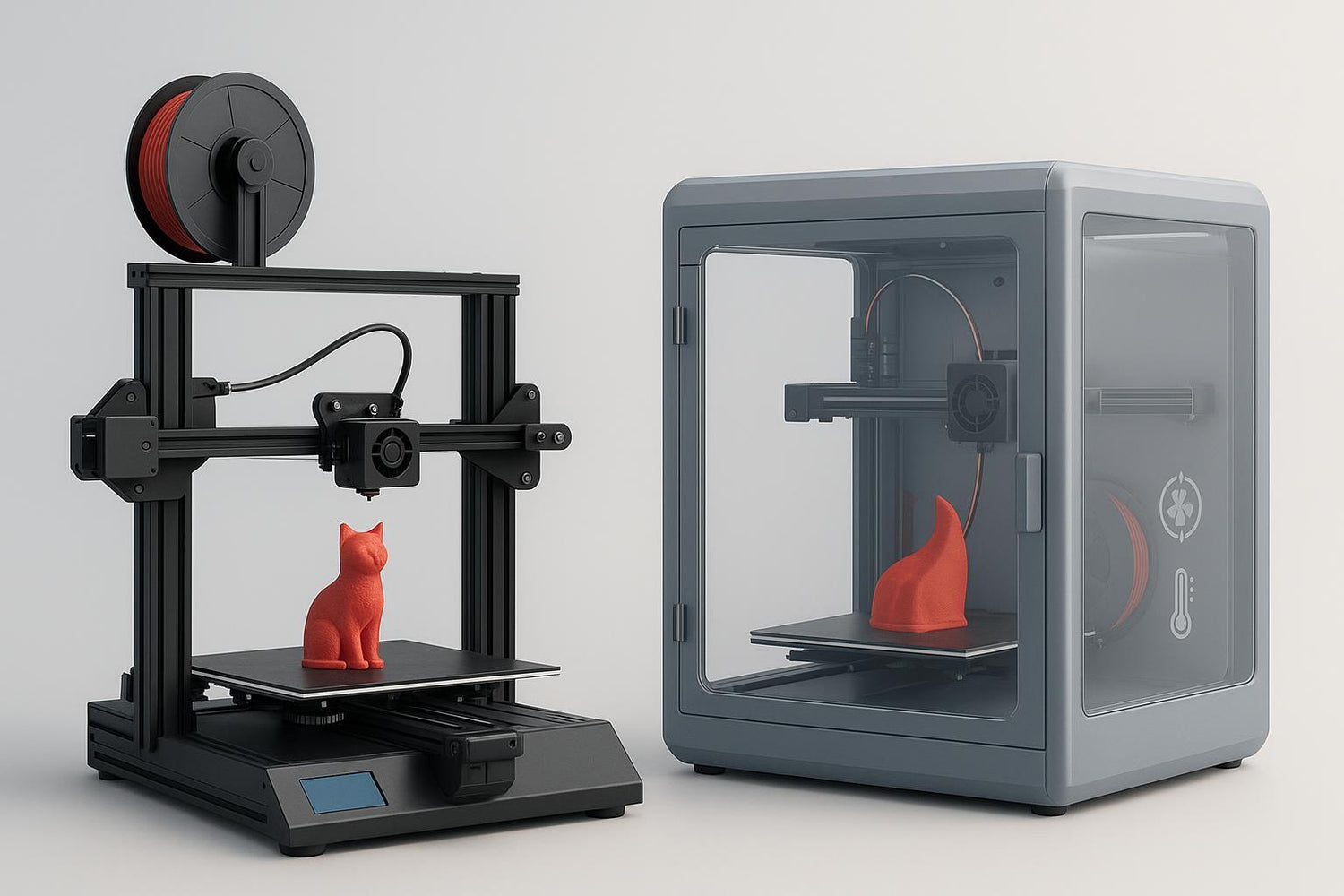
If you’re buying your first FDM 3D printer, “enclosed vs open” sounds like a spec-sheet detail. In practice, it changes three things you’ll notice immediately:
- What materials print reliably (PLA/PETG vs ABS/ASA)
- How your space feels while printing (noise, drafts, odor management)
- How easy the machine is to live with (access for maintenance and upgrades)
This is a consideration-stage buyer guide: you already know you want a printer. Now you want a decision you won’t regret.
The fast decision (start here)
Choose an open-frame printer if most of these are true:
- You’ll print mostly PLA, PETG, or TPU.
- You want the best value and easiest access for learning and maintenance.
- Your printer will live somewhere you can keep kids/pets away (or put it out of reach).
Choose an enclosed printer (or an open-frame printer + enclosure) if most of these are true:
- You want to print ABS/ASA early and don’t want to fight warping.
- Your printer runs in a shared home space and you care about keeping emissions contained.
- You print at night and want less perceived noise.
If you want a quick walkthrough of enclosure benefits and trade-offs, Sovol’s guide — Do you really need a 3D printer enclosure? — is a useful baseline.
Enclosed vs open 3D printer: one comparison table
|
What you care about |
Open-frame printers |
Enclosed printers (or an enclosure add-on) |
|---|---|---|
|
Typical beginner materials |
Great for PLA/PETG/TPU |
Great too, but you may need to vent/open the enclosure for PLA |
|
ABS/ASA success rate |
Usually harder (drafts + uneven cooling) |
Usually easier (more stable temperature, fewer drafts) |
|
Air quality management |
Emissions disperse into the room |
Contained (best paired with filtration/venting) |
|
Noise |
Generally louder |
Often quieter (panels act like a barrier) |
|
Maintenance access |
Fast and simple |
More steps (doors/panels can get in the way) |
|
Space + cost |
Usually smaller and cheaper |
Usually bigger and more expensive |
What an enclosure actually changes
An enclosure isn’t magic. It’s a box that changes the environment around your print.
1) It blocks drafts that cause warping
Drafts cool plastic unevenly. Materials like ABS and ASA shrink more as they cool, so uneven cooling is a recipe for curled corners and layer splits.
That’s why guides like MatterHackers’ “How to succeed when 3D printing with ASA filament” commonly recommend a fully enclosed environment to reduce warping and splitting.
2) It raises and stabilizes the air temperature around your part
Even a “passive” enclosure traps some heat from the bed and hotend. That steadier temperature helps parts cool more evenly.
This is the single biggest reason enclosures matter for ABS/ASA: you’re not just keeping heat in — you’re keeping the cooling consistent.
3) It changes how the printer fits into your home
- Noise: panels usually make noise less sharp.
- Safety: it’s a physical barrier between you (or curious hands/paws) and hot/moving parts.
- Cleanliness: it can reduce dust and accidental bumps.
Air quality and safety: the honest version
FDM printing can emit gases and particles. The U.S. Environmental Protection Agency notes in its overview of 3D printing research at EPA that emissions are a real consideration and depend on materials and operating conditions.
An enclosure helps because it contains emissions at the source. But containment isn’t the same as removal. For shared indoor spaces, you still want a plan:
- Vent outside when practical, especially for ABS/ASA
- Use filtration (commonly a HEPA + activated carbon approach) when venting isn’t feasible
- Avoid running higher-emission materials in tiny, unventilated rooms
⚠️ Warning: If you plan to print ABS/ASA indoors, treat ventilation and filtration as part of the purchase, not a “later” upgrade.
Beginner needs assessment: answer these 7 questions
You don’t need to “future-proof” everything. You just need to be honest about what you’ll do in the first 90 days.
1) What will you print most: PLA, PETG, or ABS/ASA?
- PLA: the easiest starter filament for most people.
- PETG: a common next step; often fine on open-frame printers.
- ABS/ASA: much more likely to benefit from an enclosure because it’s sensitive to drafts and uneven cooling.
If you’re buying your first printer and you don’t already know you need ABS/ASA, there’s a strong argument for starting with an open-frame printer and adding an enclosure only if your projects demand it.
2) What’s your typical part size?
Enclosures help more as parts get larger because larger flat areas (and long print times) give warping more chances to show up.
If you mostly print small functional brackets or miniatures in PLA, an open-frame machine can be the simplest path to early wins.
3) Where will the printer live?
- Bedroom/home office: enclosure becomes more attractive for noise and containment.
- Garage/basement/workshop: open-frame is often fine (still ventilate).
- Apartment with limited space: consider footprint; an enclosure adds bulk and needs clearance for doors.
4) Are kids or pets in the space?
If yes, enclosure isn’t just about print quality. It’s a real safety upgrade. Beginners underestimate how often you’ll reach toward the printer mid-print.
5) Do you enjoy tinkering — or do you want “just print”?
Open-frame machines are easier to access for:
- swapping nozzles
- clearing clogs
- tightening belts
- adding mods
Enclosed machines can be easier to live with day-to-day, but if you do need to fix something, it can be more fiddly.
6) Will you print PLA in an enclosure?
You can print PLA with an enclosure. You just need to manage heat.
In a warm room, a fully closed enclosure can make PLA less forgiving (soft filament, messier overhangs, more stringing, and in extreme cases, heat-related feeding issues). The simple workaround is to print PLA with a door open, with ventilation, or with chamber temps kept modest.
7) What’s your real budget — including the boring extras?
Your first setup cost isn’t just printer price:
- filament (quality matters)
- spare nozzles
- basic tools
- storage/drying
- (if enclosed) filter/venting parts
If an enclosed printer stretches your budget so far you can’t buy decent filament, you’re setting yourself up for frustration.
Three smart paths a beginner can take
Path A: open-frame printer (print PLA/PETG, learn fast)
Pick this if:
- you’re primarily printing PLA/PETG
- you want easy maintenance access
- you want the best value
This path is the simplest way to build confidence because troubleshooting is straightforward and the machine is physically approachable.
Path B: open-frame printer + 3D printer enclosure (upgrade as your projects change)
This is the modular choice: start open, then add stability/containment.
It’s especially useful when:
- you want to try ABS/ASA occasionally
- you’re not sure if you’ll stick with the hobby
- you want the option to open the enclosure for PLA and close it for ABS/ASA
Compatibility matters — don’t assume an enclosure fits every printer.
If you want Sovol options to look at, two examples are:
- the SV08 Max enclosure kit (model-specific)
- the SV08 transparent plexiglass open enclosure
Path C: fully enclosed printer (choose a controlled environment from day one)
Go fully enclosed if:
- you know you want ABS/ASA early
- you print in shared indoor spaces
- you value containment and a cleaner setup
For a compact, fully enclosed option, Sovol states in the product FAQ that Sovol Zero ships with an enclosure and glass door.
Pro tip: If you buy enclosed for ABS/ASA, also plan for how you’ll manage air (filtration/venting). An enclosure is a container — you still decide where the air goes.
Red flags and deal-breakers (what to watch for)
“Sealed” claims with no explanation of filtration or venting
A box can contain air, but it can also concentrate it. Look for a clear story about how air is filtered or exhausted.
No way to vent or open the enclosure when printing PLA
You don’t need to print PLA with the door wide open, but you do want options. Flexibility matters because your room temperature changes with seasons.
Buying enclosed to avoid learning basic setup
Enclosures improve the environment, but they don’t replace fundamentals like bed adhesion, clean build plates, and sane speeds. A “good first printer” is one you can understand.
Common beginner mistakes (and how to avoid them)
Buying enclosed “just in case,” then only printing PLA
If you’ll print mostly PLA, an enclosure is optional for print quality. If you do buy enclosed for safety/noise reasons, make sure you can manage chamber temperature.
Treating fumes as a marketing checkbox
Even if you don’t smell much, emissions can still exist. If you’re printing in a shared room, treat ventilation/filtration as seriously as you treat the printer itself.
Underestimating how much you’ll touch the machine
Beginners do maintenance. You’ll level/clean, you’ll remove stubborn prints, and you’ll eventually swap parts. If you hate fiddling, prioritize accessibility and community support.
FAQ
Do you need a 3D printer enclosure for PLA?
Usually not for print quality. If you’re printing PLA in a reasonably stable room, an open-frame printer is typically fine. An enclosure can still help with noise and keeping hands/pets away.
Is an enclosed 3D printer safer?
Safer in a practical sense: it adds a physical barrier between you and hot/moving parts, and it can help contain emissions. But “safer” still depends on your ventilation/filtration plan, your materials, and where the printer runs.
Is open frame vs enclosed 3D printer mainly about print quality?
For PLA, not always. For ABS/ASA, often yes — because temperature stability and draft control make a bigger difference.
Can you add an enclosure later?
Yes. Many people start open-frame, then add an enclosure when they move to ABS/ASA or when they want better containment and noise control.
Next steps
- Decide which path you’re on (open-frame, open + enclosure, or fully enclosed).
- If you’re printing ABS/ASA indoors, decide your air plan (vent outside, filter, or both).
- Then shop based on compatibility and your space — don’t buy an enclosure before you know what printer it’s meant to fit.
