








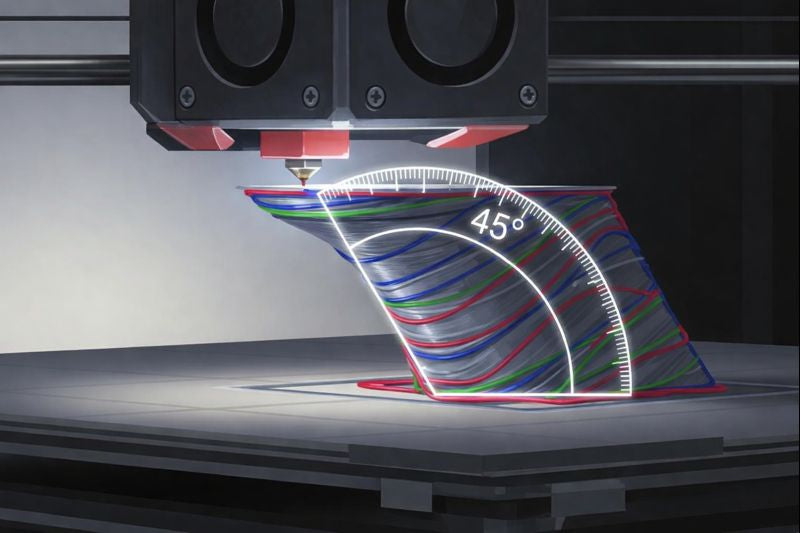
The 45° rule guides the design of 3d printing projects. This rule states that overhangs should not exceed a 45-degree angle for stable layers. The 45° rule helps 3d printers create strong parts using less support material. In 3d technology, following the 45-degree rule improves the quality of 3d-printed objects and complex prototypes. Good design supports mass customization and efficient printing. The 45° rule also reduces waste, which makes this technology ideal for customization and rapid prototypes in modern manufacturing.
Key Takeaways
- The 45° rule states that overhangs should not exceed a 45-degree angle for stable 3D prints. Following this rule improves print quality and reduces defects.
- Using the 45° rule minimizes the need for support structures, saving material and lowering costs. This leads to cleaner prints and less waste.
- Designing parts with overhangs at or below 45 degrees enhances strength and stability. This approach supports rapid production and mass customization.
- Proper orientation of models can reduce steep overhangs, improving print quality and reducing the need for supports. Always consider the final product's appearance.
- Advanced techniques and careful planning can allow for breaking the 45° rule, but testing is essential to ensure print success.
Why the 45° rule matters in 3d printing
Print quality impact
The 45° rule plays a key role in 3d printing. It helps maintain the strength and quality of each part. When designers follow this rule, they create additive parts with better surface finish and fewer defects. The rule limits the angle of overhang, which keeps layers stable during printing. Research shows that materials printed at a 45-degree angle have lower strength and ductility.
- The ultimate strength of a 45-degree microstructure sample is 48.82 MPa, which is 7% lower than the reference specimen's strength of 52.5 MPa.
- The elongation of the 45-degree sample is 5.93%, showing a 24% reduction compared to the reference value of 7.8%.
These results show that the 45° rule affects the strength and flexibility of additive parts. Designers must consider these factors to achieve high-quality manufacturing.
Supports & material use
The 45° rule helps reduce the need for supports in 3d printing. When overhangs stay within the 45-degree limit, parts can be printed with fewer support structures. This approach saves material and lowers costs.
Designers who follow the rule use less support, which means less waste and easier post-processing.
The rule also prevents sagging and poor surface finish. By minimizing supports, additive manufacturing becomes more efficient and sustainable. Less support means less material used and less time spent removing supports after printing.
Manufacturing efficiency
Manufacturing efficiency improves when the 45° rule guides design choices. Adhering to this rule means fewer supports and cleaner additive parts.
- Eliminating supports leads to cleaner prints.
- Less time is required for support removal, which reduces post-processing time.
- Manufacturing becomes faster and more reliable.
Designers who use the 45° rule create parts that are easier to print and finish. This approach supports rapid production and mass customization in additive manufacturing. The rule helps save material, time, and effort, making 3d printing a smart choice for modern manufacturing.
How the 45-degree rule works
Overhangs & layer contact
In 3d printing, each new layer must rest on the layer below it. This principle is important for creating strong and accurate parts. When a printer builds an overhang, the angle of that overhang determines how much of the new layer touches the previous one. If the angle is less than or equal to 45 degrees, at least half of the new layer sits on the layer below. This is called 50% layer contact. The filament has enough support to keep its shape and avoid drooping.
Tip: Keeping overhangs at or below 45 degrees helps prevent sagging and improves the strength of the finished part.
If the angle goes beyond 45 degrees, less of the new layer touches the previous one. This can cause the filament to hang in the air, leading to poor adhesion and weak spots. In additive manufacturing, unsupported layers often result in sagging, dimensional errors, or even print failures. Most 3d printers can handle overhangs up to 45 degrees with minimal issues. Some advanced printers and settings may allow for steeper angles, but the risk of problems increases.
Critical angle explained
The 45-degree rule is based on the idea of a "critical angle." This angle marks the point where a new layer no longer has enough support from the layer below. The table below shows how different angles affect the need for support structures:
|
Rule |
Description |
Implication |
|---|---|---|
|
45-Degree Rule |
Each new layer must be supported by the layer below it. |
Layers extending beyond 45 degrees will droop, requiring support structures to prevent failure. |
|
Safe Zone |
Angles up to 45 degrees from vertical are generally safe. |
Filament overlaps the previous layer enough to hold its shape. |
|
Danger Zone |
Angles greater than 45 degrees require support structures. |
Unsupported overhangs lead to drooping or sagging, affecting print quality. |
Recent research shows that the maximum overhang angle without support is usually around 30 degrees. Angles between 30 and 45 degrees can be printed, but may show some defects. When the angle goes above 50 degrees, the part may collapse completely. The type of infill pattern also affects the maximum angle. For example:
|
Infill Pattern Type |
Maximum Achievable Overhang Angle (degrees) |
|---|---|
|
Triangle |
Up to 50 |
|
Grid |
Up to 60 |
Adjusting layer height and extrusion speed can help print steeper angles, but the 45-degree rule remains a safe guideline for most projects.
Compliant vs. non-compliant designs
Designers can follow or break the 45-degree rule depending on the project. Compliant designs keep all overhangs at or below 45 degrees. These parts print smoothly, need little or no support, and have good surface quality. For example, a simple box or a part with sloped sides follows the rule.
Non-compliant designs include overhangs greater than 45 degrees. These parts often need extra support structures. Ignoring the rule can lead to drooping, sagging, or even failed prints. For example, a horizontal bridge or a sharp ledge breaks the rule and may require supports.
Here are some ways to design for better results:
- Use chamfers instead of sharp edges to reduce overhang angles.
- Orient the model so that steep overhangs face upward.
- Choose infill patterns like grid or triangle to support higher angles.
Simulation tools, such as ANSYS Process Simulation, help predict how overhangs will perform during 3d printing. These tools can show where distortions or failures might occur, allowing designers to adjust their models before printing.
Note: Following the 45-degree rule in additive manufacturing leads to stronger parts, less material waste, and fewer print failures.
Applying the 45° rule in model orientation
Design for self-support
Design for additive manufacturing, or dfam, focuses on creating parts that support themselves during 3d printing. This approach reduces the need for extra supports and saves material. When designing parts, keep overhangs at or below 45 degrees. This makes the geometry more stable and improves strength. The table below shows how dfam principles help with self-support:
|
Principle |
Explanation |
|---|---|
|
45° Overhang Rule |
Integrating chambers into designs simplifies adherence to the 45° rule, reducing the need for support material. |
|
Support Structures |
Overhangs exceeding 45° require support material or clever modeling techniques to ensure successful printing. |
Designing parts with gradual slopes instead of sharp ledges helps maintain strength and reduces weight. This method also increases design freedom, allowing for more complex shapes without extra supports.
Orientation strategies
Proper orientation is key in dfam. The way a part sits on the print bed affects support, material use, and weight. Use these strategies to optimize orientation:
- Avoid steep overhangs and extreme angles in your design.
- Rotate the model to minimize overhangs that exceed 45 degrees.
- Split complex geometry into multiple parts if needed.
- Consider the final product’s appearance and the visibility of supports.
The table below compares orientation strategies for complex models:
|
Strategy |
Description |
Implication for Overhangs |
|---|---|---|
|
45° Rule |
Overhangs exceeding 45° need support; under 45° can bridge themselves. |
Helps determine when supports are necessary. |
|
Reduce Overhangs |
Rotate parts to minimize steep overhangs, potentially eliminating supports. |
Enhances print quality and reduces material use. |
The 45-degree orientation is a proven guideline that balances support needs, minimizes the staircase effect, and improves both print quality and structural strength.
Slicer settings
Slicer software helps prepare 3d models for additive printing. Adjusting slicer settings can improve strength, reduce weight, and optimize material use. The table below lists important slicer settings for dfam:
|
Slicer Setting |
Description |
|---|---|
|
Wall Thickness |
Control the thickness of the wall to optimize material usage and support. |
|
Layer Height |
Use a layer height less than 40% of the nozzle size for better adhesion and print quality. |
|
Infill Settings |
Enable 'Only infill where needed' to reduce overall infill requirements. |
|
Vertical Shell Thickness |
Ensure adequate shell thickness for sloping roofs without additional design fixes. |
|
Extra Perimeters |
Add extra perimeters if needed to enhance the quality of sloping surfaces. |
Keep in mind that slicer software does not automatically enforce the 45° rule. Overhangs greater than 45 degrees usually need supports, so always check your model before printing. Adjusting the overhang angle in slicer settings can help balance support, material, and weight for the best results in additive manufacturing.
Exceptions & advanced techniques
When to break the rule
Sometimes, designers need to break the 45° rule to achieve certain shapes or features. Advanced printing techniques and careful planning can make this possible. An overhang test helps determine how far a printer can push the limits before needing support material. For example, some printers can handle steeper angles by adjusting cooling or using special materials. When the overhang angle goes beyond 45°, supports become necessary to prevent sagging or collapse. Optimizing print settings, such as lowering the print speed or changing the layer height, can also improve results for challenging angles.
Printer & material factors
Different printer technologies and materials affect how well overhangs print. The table below compares two common printer types:
|
Printer Technology |
Support Requirement for Angles > 45° |
Implications for 45° Rule |
|---|---|---|
|
FDM |
Requires supports, leading to waste |
Limited applicability |
|
SLA |
Less extensive supports needed |
Greater applicability |
The choice of material plays a big role in overhang performance. Some materials resist sagging better than others. When using an overhang test, results may vary based on the type of filament or resin. Materials with higher strength or faster cooling rates can handle steeper angles. For best results, store material at the right temperature and humidity. The table below shows how the environment affects overhangs:
|
Evidence Description |
Impact on Overhang Performance |
|---|---|
|
Ideal storage temperature is between 10°C and 30°C to prevent condensation and damage. |
Prevents issues that could affect print quality and overhangs. |
|
Cold environments can cause uneven cooling, leading to warping and poor adhesion. |
Affects the structural integrity of overhangs. |
|
High temperatures can lead to sagging in overhangs due to insufficient cooling. |
Directly impacts the quality of overhangs and bridges. |
Troubleshooting overhangs
When overhangs fail, several steps can help improve print quality:
- Cool the part quickly to solidify the material.
- Lower the layer height for better support.
- Change the print order to increase stability.
- Print at a slower speed to allow more cooling.
- Reduce the printing temperature to help the material set faster.
- Add chamfers to reduce the angle of overhangs.
- Use support material, especially water-soluble types, for cleaner results.
- Split complex models into smaller parts if needed.
Running an overhang test before printing a final part helps identify the best settings for your printer and material. Careful troubleshooting and adjustments can lead to successful prints, even when breaking the 45° rule.
The 45° rule shapes successful 3D printing by improving accuracy and reducing distortion. The table below shows how a 45° build angle offers the best fit and minimal distortion:
|
Build Angle |
Support Density |
Dimensional Accuracy |
Distortion |
|---|---|---|---|
|
0° |
High |
Low |
High |
|
45° |
Optimal |
Best |
Minimal |
|
90° |
Low |
High |
High |
Following this rule balances support needs and strengthens prints. For more on advanced overhangs, explore resources on bridging, arc overhangs, and innovations like the RotBot.
FAQ
Why do overhangs above 45 degrees need supports?
Overhangs above 45 degrees have less contact with the layer below. The filament can sag or fall. Supports give extra help so the print does not collapse.
Can all 3D printers handle overhangs at 45 degrees?
Most desktop FDM printers can print up to 45 degrees without problems. Some advanced printers or materials can handle steeper angles. Always test your printer with an overhang test.
How can I reduce the need for supports in my design?
Tip: Use gentle slopes, chamfers, or split your model into smaller parts. Orient the model so steep overhangs face upward. These steps help reduce support material.
Does the 45° rule apply to all materials?
The 45° rule works for most common materials like PLA and ABS. Some materials with better cooling or strength can handle steeper angles. Always check the material’s guidelines.
