






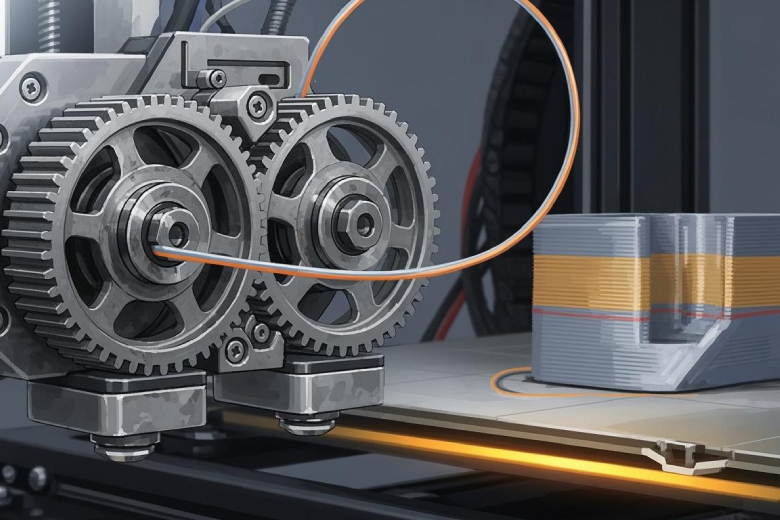
A powerful dual-gear extruder fits most 3d printers when users need reliable performance. Many users report that this extruder delivers consistent filament control and strong grip, which reduces slipping and under-extrusion. They find it especially useful for flexible materials, making it versatile for different 3d projects. High durability and increased torque stand out as pros, while higher cost and added complexity can be drawbacks. Each user should consider their specific 3d printer and project needs before upgrading. This guide helps users make an informed decision about choosing a powerful dual-gear extruder.
Key Takeaways
- Dual-gear extruders provide strong grip and precise filament control, reducing slipping and improving print quality.
- These extruders handle a wide range of materials, including flexible and abrasive filaments, making them versatile for various projects.
- Upgrading to a dual-gear extruder can enhance print quality, leading to smoother surfaces and fewer defects in 3D prints.
- Consider your specific printing needs and budget before upgrading, as dual-gear extruders can be more complex and costly than single-gear options.
- Regular maintenance, such as checking gear alignment and tension, is essential to keep dual-gear extruders functioning optimally.
What Is a Powerful Dual-Gear Extruder
Dual-Gear Mechanism Overview
A dual-gear extruder uses two synchronized gears to grip and move filament through the 3d printer. This design provides equal force on both sides of the filament, which improves grip and reduces slipping. The extruder increases surface area contact, allowing for more precise filament control. Users find that this mechanism handles a wider range of filament types, including flexible materials like TPU. The extruder also enables more accurate retractions, which helps reduce stringing and improves print quality. Many 3d enthusiasts choose dual-gear extruders for their reliability and ability to print with challenging filaments.
Tip: Dual-gear extruders make it easier to print flexible filaments, which often cause problems in single-gear systems.
Popular brands offer several models that suit different needs. The table below compares some of the most recognized dual-gear extruders available for 3d printers:
|
Model |
Type |
Max Temp |
Weight (g) |
Best For |
|---|---|---|---|---|
|
E3D V6 |
Direct/Bowden |
300°C |
98 |
High-temp materials, general use |
|
Bondtech BMG |
Direct |
280°C |
75 |
Flexible & abrasive filaments |
|
Titan Aero |
Bowden |
250°C |
62 |
Speed-focused builds |
|
Slice Eng. Mosquito |
Direct |
350°C |
58 |
Compact, high-performance setups |
Users praise these extruders for eliminating skipped steps and reducing oozing. Brands like Bondtech and E3D receive positive feedback for build quality and reliability. Some users report challenges with calibrating retraction values and installation, but most agree that dual-gear extruders improve overall extrusion performance.
Gear Reduction and Torque Benefits
Gear reduction plays a key role in the performance of a dual-gear extruder. Models such as the Bondtech BMG use a 3:1 gear ratio, which triples the torque output from the motor. This increased torque allows the extruder to push filament with greater force, making it easier to print with tough or flexible materials. A typical stepper motor needs about 0.7 N-m of torque to drive the filament gears. With gear ratios of 3:1 or even 5:1, the extruder multiplies the available torque, which improves extrusion consistency and reduces the risk of under-extrusion.
- Dual-gear extruders deliver more extrusion force, which helps prevent filament jams.
- Higher torque supports reliable feeding of abrasive and flexible filaments.
- Gear reduction enables smoother and more controlled extrusion, especially during fast or complex 3d prints.
The combination of dual gears and gear reduction makes these extruders a strong choice for users who want dependable extrusion and the ability to work with a wide variety of filaments.
Dual-Gear Extruder Advantages
Strong Grip and Precise Feeding
A dual-gear extruder uses two gears to grip the filament from both sides. This design gives the extruder a strong hold, which prevents slipping and ensures steady feeding. The extruder pushes filament with consistent force, which helps maintain precision during 3d printing. Many users notice that the extruder eliminates clicking sounds and filament slippage. The result is smoother prints and fewer interruptions. The extruder also manages flexible filaments better than single-gear models, allowing for more complex 3d projects.
Tip: A dual-gear extruder improves precision and reduces the risk of under-extrusion, especially when printing with soft or flexible filaments.
Durability and Reliability
The extruder features metal gears and a robust build. This construction increases durability and reliability during long-term use. Users often choose a dual-gear extruder for its ability to handle frequent 3d printing sessions without wearing out quickly. However, some common issues can occur over time. The table below shows typical failure points:
|
Issue Type |
Description |
|---|---|
|
Gear Meshing Problems |
Dual gear extruders often face gear meshing issues that can lead to uneven extrusion. |
|
Uneven Extrusion |
Excessive tension on the idler can cause visible defects in the extrusion process. |
|
Wear on Filament |
The gears can wear down the filament, leading to grinding and feeding issues during operation. |
The extruder usually performs well, but users should check for gear alignment and tension to avoid these problems.
Material Compatibility
A dual-gear extruder works with a wide range of filaments. Users print with flexible, abrasive, and standard materials using the same extruder. The strong grip and increased torque allow the extruder to feed tough filaments without jamming. Many users find that the extruder supports more 3d projects because it handles different filament types with ease. The extruder also reduces the chance of filament grinding, which keeps feeding consistent.
Enhanced Print Quality
Upgrading to a dual-gear extruder often leads to better print results. Users report smoother surfaces and fewer defects in their 3d prints. The extruder provides steady extrusion, which improves layer consistency and overall precision. Some users mention that the extruder eliminates filament slippage, resulting in high-precision prints. Others find that the extruder manages flexible filaments well, enabling more detailed and complex models.
- Users have noticed significant improvements in print quality after switching to a dual-gear metal extruder.
- The extruder eliminates clicking and filament slippage, which leads to smoother prints.
- The extruder handles flexible filaments better than stock plastic models, allowing for more advanced 3d designs.
A dual-gear extruder offers strong grip, reliable feeding, and enhanced precision. These advantages make it a popular choice for users who want consistent extrusion and high-quality 3d prints.
Dual Extruder and Dual Extrusion Benefits
Multi-Material Printing
A dual extruder opens new possibilities for 3d printing. This system allows users to print with two different materials in a single job. Many designers use a dual extruder to combine rigid and flexible materials in one part. This approach creates objects with hybrid properties, such as a hard shell and a soft grip. Dual extruder systems also support multi-material printing, which lets users add special features like conductive traces or transparent windows. The ability to switch between materials during extrusion increases the range of projects that a 3d printer can handle.
Note: Dual extruder systems make it possible to print models with distinct color separations without extra post-processing.
Soluble Support Structures
Dual extrusion brings a major advantage to 3d printing by enabling the use of soluble supports. These supports dissolve in water or a special solution after printing. This process leaves a clean surface and protects delicate features. Soluble supports help users print complex shapes and internal cavities that would be impossible with traditional supports. They also prevent damage to fine details during support removal. Many users find that dual extrusion with soluble supports improves the quality of high-detail models.
- Soluble supports allow for intricate designs and overhangs.
- They dissolve completely, leaving no residue behind.
- These supports make it easier to print parts with internal channels or moving joints.
Versatile Design Possibilities
Dual extrusion expands the creative options for designers and engineers. The use of two extruders enables the production of complex models that require different materials or colors. This method supports the creation of intricate geometries and advanced features. Dual extruder systems also reduce printing time for multi-part models by allowing simultaneous extrusion. The table below highlights the main advantages of dual extruder systems:
|
Advantage |
Description |
|---|---|
|
Complex Models |
Enables intricate 3d prints with multiple materials. |
|
Reduced Printing Time |
Minimizes time for dual-material or separate models. |
|
Flexibility in Design |
Allows innovative designs not possible with single extruders. |
|
Simplified Support Use |
Facilitates soluble supports for a cleaner finish. |
Dual extrusion gives users the tools to create advanced designs, improve print quality, and streamline the printing process.
Disadvantages of Dual-Gear and Dual Extruders
Increased Complexity
A dual extruder setup introduces several layers of complexity to the printing process. Users must manage two extruders, which increases the number of moving parts and potential points of failure. The process of switching between active extruders can take extra time and may require troubleshooting. Designers also face more complicated slicing and print preparation compared to single extruder systems. The following table highlights common sources of increased complexity:
|
Source of Complexity |
Description |
|---|---|
|
Extruder Switching |
Changing between extruders during dual extrusion can slow down printing and cause maintenance issues. |
|
Slicing and Design |
Preparing files for dual extrusion demands more advanced skills and software knowledge. |
Higher Cost
Dual extruder systems and dual-gear extruders often cost more than single extruder setups. Manufacturers use higher-quality materials and more precise engineering, which raises the price. Users must also purchase additional hardware and sometimes upgrade their printer’s electronics. The investment may not pay off for those who only need basic printing capabilities.
Maintenance Needs
Dual-gear extruders require more frequent maintenance than single extruder models. Users must calibrate E-steps after upgrading, since the gear radius changes. The extruder design can include flaws, such as missing washers or weak bearings, which may lead to premature wear. The table below outlines typical maintenance requirements:
|
Maintenance Requirement |
Description |
|---|---|
|
Calibration of E-steps |
Upgrading to a dual-gear extruder requires updating E-steps from 100 to 139 due to gear size. |
|
Design flaws |
Lack of washers and weak bearings can cause wear and failures over time. |
Overkill for Simple Projects
Many users find dual extruder and dual extrusion setups excessive for basic 3d printing tasks. Most simple projects use standard filaments and do not need multi-material capabilities. One user noted,
"The general architecture of having two extruders fixed side by side has its limitations. For one, I usually print using PETg plastic, which tends to ooze and drip a lot more than the PLA plastic that is so popular with 3D printers. Also, the right extruder does tend to drag across the print, and if the print ever warps or curls up the slightest bit, it is in danger of catching on the other extruder and ripping the print off of the bed."
Dual extruder systems can complicate the workflow and introduce risks that do not benefit simple printing needs.
Dual-Gear vs. Single-Gear Extruder Comparison
Performance Differences
A dual-gear extruder offers several advantages over a single-gear extruder. It provides increased extrusion force, which helps the printer handle a wider range of materials. This extra force can allow for faster printing speeds without sacrificing quality. The dual-gear system also gives the filament a superior grip. This reduces the chance of slipping and leads to more consistent extrusion. Many users notice that dual-gear extruders enable more precise retractions. This accuracy helps reduce stringing and improves the overall quality of 3d prints.
- Increased extrusion force supports faster print speeds.
- Superior grip prevents filament slipping.
- Precise retractions improve print quality.
Filament Compatibility
Filament compatibility is a key difference between these two extruder types. A single-gear extruder works well with standard filaments, such as PLA and ABS. However, it can struggle with flexible or abrasive materials. A dual-gear extruder handles a broader range of filaments. Its strong grip and even pressure make it easier to print with flexible filaments like TPU. It also manages abrasive materials better, reducing the risk of jams or grinding. This versatility allows users to explore more advanced printing projects.
Upgrade Considerations
Upgrading from a single-gear to a dual-gear extruder involves several important steps. Users should consider wiring adjustments, firmware modifications, and possible changes to the toolhead design. The table below outlines these factors:
|
Factor |
Description |
|---|---|
|
Wiring adjustments |
New wiring is required for the dual-gear motor. |
|
Firmware modifications |
Adjustments in firmware are necessary to accommodate the new extruder setup. |
|
Toolhead design changes |
Potential redesign of the toolhead may be needed to support dual extrusion. |
A dual-gear extruder can improve printing performance and material compatibility, but the upgrade process requires careful planning.
Decision Guide: Is a Dual-Gear Extruder Right for You
Needs Checklist
A dual extruder offers advanced features, but not every user needs these capabilities. Before upgrading, individuals should review a checklist to determine if a dual-gear extruder matches their requirements. The table below highlights important factors to consider:
|
Description |
|
|---|---|
|
Motor Type and Torque |
Stepper motors should provide at least 0.3 N·m of holding torque for reliable feeding. |
|
Gear Ratio |
Geared extruders often use 3:1 or 5:1 ratios; higher ratios give more torque but reduce feed speed. |
|
Filament Compatibility |
Confirm support for 1.75 mm or 2.85 mm filament diameters; proper idler tension is crucial. |
|
Nozzle and Hot End Integration |
Ensure compatibility with common hot ends to avoid issues like heat creep. |
|
Cooling and Heat Dissipation |
Look for aluminum housings or integrated heatsinks to prevent overheating. |
|
Tension Adjustment Mechanism |
Different mechanisms affect how easily users can fine-tune grip without damaging filament. |
|
Mounting Standard |
Verify fitment with the machine, as most modern extruders follow NEMA 17 footprint. |
A dual extruder system requires careful evaluation of these technical details. Users who print with flexible or abrasive filaments, or who need precise control, benefit most from these features.
Printer Compatibility
Printer compatibility plays a major role in the decision to upgrade. Not every 3D printer supports dual extruder setups or dual extrusion. Users should check the mounting standard, such as the NEMA 17 footprint, to ensure the extruder fits their machine. The hot end and nozzle must also match the new extruder. Some printers need firmware updates or wiring changes to support dual extrusion. Aluminum housings and integrated heatsinks help with cooling, but only if the printer design allows for these upgrades.
A dual extruder may require changes to the toolhead or electronics. Individuals should review their printer’s specifications before purchasing. If the printer cannot support dual extrusion, users may need to consider alternative upgrades.
Project Suitability
Project requirements influence the choice of extruder. Designers who create complex models or need multi-material printing often choose a dual extruder. This system enables dual extrusion, which allows for two filaments in one print job. Users can print intricate designs, combine rigid and flexible materials, or use soluble supports for advanced geometry.
- Complex designs often require precise filament control.
- Multi-material printing expands creative options.
- Dual extruder types, such as IDEX or fixed, offer different levels of precision and efficiency.
Individuals who focus on simple projects may not need dual extrusion. For basic printing tasks, a single extruder provides enough capability. Those who want to increase productivity and explore new design possibilities benefit most from a dual extruder.
Budget Factors
Cost remains a key consideration when choosing a dual extruder. The table below outlines typical price tiers for extruder upgrades:
|
Description |
|
|---|---|
|
Budget Tier |
$20–$50: Basic single-gear direct-drive kits, suitable for casual users. |
|
Mid-Range |
$50–$100: High-quality clones or original designs with dual-drive mechanisms. |
|
Premium Tier |
$100+: Professional-grade solutions designed for industrial use and extreme durability. |
A dual extruder in the mid-range or premium tier offers advanced features and durability. Users who print frequently or need high productivity should consider investing in a higher-quality model. Those with limited budgets may find single-gear extruders more suitable for their needs.
Tip: Individuals should balance their project goals, printer compatibility, and budget before upgrading to a dual extruder. Careful planning ensures the best results and avoids unnecessary expenses.
Powerful dual-gear extruders offer strong grip, reduced filament grinding, and better performance with flexible materials. They add complexity and cost, which may not suit every user. The table below compares key features:
|
Feature |
Dual-Gear Extruder |
Single-Gear Extruder |
|---|---|---|
|
Filament Grip |
Better grip, less slippage |
May slip in some setups |
|
Filament Grinding |
Reduced |
Higher risk |
|
Suitability |
Less rigid setups |
Rigid setups |
Users should match their printer type, project needs, and budget before upgrading. Careful evaluation leads to the best choice.
FAQ
What types of filaments work best with dual-gear extruders?
Dual-gear extruders handle flexible, abrasive, and standard filaments well. They grip TPU, PETG, PLA, and nylon securely. Users see fewer jams and smoother feeding with these materials.
Does a dual-gear extruder require special maintenance?
Regular cleaning and gear inspection keep the extruder working smoothly. Users should check gear alignment and tension. Lubricating moving parts helps prevent wear.
Can every 3D printer use a dual-gear extruder?
Not all printers support dual-gear extruders. Users must check mounting compatibility and firmware requirements. Some machines need wiring changes or toolhead modifications.
Will a dual-gear extruder improve print quality?
Most users report better layer consistency and fewer defects. The strong grip reduces filament slipping. Prints show smoother surfaces and improved detail.
