






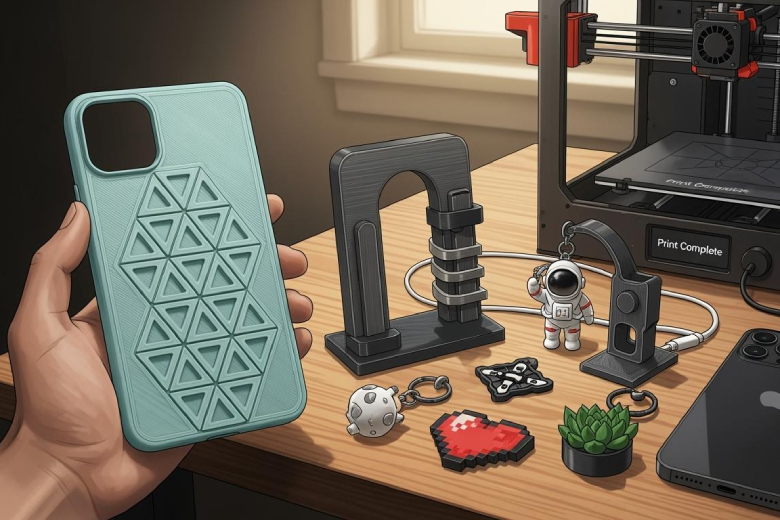
Anyone can create your own 3d printer phone accessories with basic tools and clear guidance. The process involves design, model preparation, printing, and finishing. Beginners often face challenges such as meeting user needs, selecting materials, maintaining functionality, and testing fit. They should consider experimenting with different materials and custom features to achieve unique results. Free or paid 3D modeling software helps users develop skills and access online resources for inspiration and pre-made models.
Common challenges for beginners include:
- Ensuring the accessory protects the phone and looks appealing
- Maintaining comfort and ease of use
- Setting up the printer and choosing materials
- Testing fit and making adjustments
Key Takeaways
- Anyone can design and print custom phone accessories with basic tools and guidance. Start by measuring your phone accurately to ensure a perfect fit.
- Choosing the right materials is crucial. Flexible TPU and soft PLA are great options for durability and comfort in phone cases.
- Use beginner-friendly software like Tinkercad to create your designs. Downloading pre-made models can save time and help you get started.
- Post-processing steps like sanding and painting enhance the look of your phone case. Always wear a mask when sanding to protect your health.
- Testing the fit and durability of your case is essential. Make adjustments as needed to ensure it protects your phone effectively.
Essential Tools for 3D Printer Phone Accessories
Choosing Your 3D Printer
Selecting the right 3D printer for phone accessory projects requires careful consideration. Users should evaluate project requirements, including the function and characteristics of the accessory. Mechanical properties such as strength and flexibility play a crucial role in the durability of a custom phone case. Printability and ease of use depend on the printer’s compatibility with chosen materials. Availability and cost of materials may affect project feasibility. Post-processing needs, like sanding or painting, also influence the final result.
Tip: Always check the printer’s specifications to ensure it supports the materials needed for your 3d printer phone accessories.
Essential hardware tools include:
- Nuts, bolts, and washers (M2, M3, M4, M5 recommended)
- Heated inserts
- NFC chips
- Magnets
- Springs
- Fans
Filament and Materials
The choice of material determines the performance and feel of a 3d printed iphone case. TPU offers flexibility and shock absorption, making it ideal for phone cases. Soft PLA provides a balance between flexibility and durability. PRO Series Flex filament creates rubbery, impact-resistant parts suitable for custom designs. These materials bend and flex under pressure, bounce back without cracking, and offer better grip than hard plastics.
Environmental impacts to consider:
- 3D printing reduces material waste compared to traditional manufacturing.
- Localized production lowers the carbon footprint.
- PLA is biodegradable and low in toxicity, but brittle.
- ABS offers durability but is not biodegradable.
Design Software Options
Designing 3d printer phone accessories starts with choosing the right software. Tinkercad stands out as the most beginner-friendly option, offering a web-based, drag-and-drop interface. Fusion 360 and Blender provide advanced features for users seeking more control over their 3d model. Online resources and 3d printing service platforms offer downloadable models for those who prefer ready-made solutions.
|
Advantages |
Disadvantages |
|
|---|---|---|
|
Free |
No cost involved. |
Limited features. |
|
Paid |
Advanced features. |
Financial investment. |
Safety Note: Ergonomic design, enclosure integration, and ventilation are essential for safe operation. Personal protective equipment and regular printer updates help prevent accidents.
Design Your Phone Case
Measuring Your Phone
Accurate measurements form the foundation of any successful phone case project. Each phone model features unique dimensions, button placements, and camera locations. Designers must confirm the exact phone model before starting the design process. Using a digital caliper, they can measure the length, width, thickness, and the precise positions of buttons, ports, and cameras. Even a small error in measurement can lead to a case that does not fit or blocks essential features.
Common mistakes often occur at this stage. Many beginners overlook the importance of precise measurements, which results in fitting issues. Some designers choose a case thickness that is too great, making the phone bulky and difficult to use. Others forget to account for the tolerances required for 3D printing. When the initial fit is not perfect, the "sand and drill" method can help refine the case for a snug fit.
Tip: Always double-check measurements and compare them with official specifications from the phone manufacturer.
Modeling a Custom Phone Case
After gathering accurate measurements, designers move to the modeling phase. They use 3D modeling software to create a digital representation of the phone case. The design process should focus on both protection and usability. Designers must ensure that the case includes precise cutouts for buttons, ports, and cameras. Misaligned cutouts can affect the phone’s functionality, such as blocking the camera or making buttons hard to press.
- Confirm the exact phone model to ensure proper fit, as different models have varying dimensions and camera placements.
- Ensure precise cutouts for buttons, ports, and cameras to avoid functionality issues, such as misaligned camera holes affecting photo quality.
Customization adds value to any custom phone case. Designers can add features like textured grips, kickstands, or card holders. They may use stock photos for inspiration, helping them visualize patterns, colors, or unique design elements. Experimenting with different material options, such as flexible TPU or soft PLA, allows for a balance between protection and comfort. When working with a 3d printing service, designers should communicate their material preferences and design requirements clearly.
Note: A well-designed 3d printed iphone case not only protects the device but also reflects the user’s personality.
Downloading Pre-Made Models
Not every designer wants to start from scratch. Many choose to download pre-made 3d model files from reputable online platforms. These resources offer a wide range of designs for popular phone models, including:
When using these models, designers must pay close attention to licensing terms. Some licenses allow only personal use, while others permit commercial distribution. For those planning to sell physical 3d printer phone accessories, a commercial license is necessary. Editorial licenses do not cover the sale or distribution of tangible objects. Always verify that the license allows for physical production before using or modifying a downloaded design.
Designers who want to design your own phone case can use pre-made models as a starting point. They can customize these designs by adding patterns, changing the thickness, or incorporating new features. This approach saves time and ensures compatibility with specific phone models.
Tip: Downloading high-quality models from trusted sources reduces the risk of printing errors and ensures a better final product.
Preparing and Printing Your 3D Printed Phone Case
Exporting STL/OBJ Files
After completing the design phase, users must export the 3d model in a format compatible with consumer 3D printers. The most common file formats include STL and OBJ, which work well for most 3d printer phone accessories. Other formats, such as 3MF, AMF, and VRML, offer additional features like color mapping and enhanced material properties. The table below summarizes the main file formats and their descriptions:
|
File Format |
Description |
|---|---|
|
STL |
A standard format for 3D printing, containing facet data and ensuring compatibility between CAD programs and printers. |
|
OBJ |
Widely used and compatible with most printers, supporting geometry and texture information. |
|
3MF |
Stores all model-related data in one archive, streamlining the printing process. |
|
AMF |
Supports color and material properties, improving build table layout. |
|
VRML |
Contains UV color maps, suitable for dual-extruder printers. |
Users should select the format that best matches their printer and project requirements. Saving the file in the correct format ensures a smooth transition to the slicing stage and prevents compatibility issues during getting it printed.
Tip: Always verify the exported file by opening it in slicing software before proceeding to the next step.
Slicing and Print Settings
Slicing software converts the exported 3d model into instructions that the printer can understand. This step is crucial for achieving the desired strength, detail, and appearance in a 3d printed phone case. Users must adjust several settings to optimize the print:
|
Setting |
Description |
|---|---|
|
Layer Height |
Smaller heights produce higher resolution and smoother surfaces, enhancing detail. |
|
Shell Thickness |
Increasing perimeters strengthens the case, often more than infill adjustments. |
|
Higher densities improve part strength; a typical value is around 20%. |
|
|
Cooling Settings |
Proper cooling prevents sagging in overhangs and bridges, improving overall quality. |
Experimenting with colors and material types can yield unique results. For example, flexible TPU provides shock absorption, while soft PLA offers a balance between flexibility and durability. Users may choose vibrant colors or translucent filaments to create a custom look. The slicing stage also allows for the addition of supports, brims, or rafts to improve adhesion and print success.
A step by step guide for slicing includes:
- Import the exported file into the slicing software.
- Select the desired material profile.
- Adjust layer height, shell thickness, and infill density.
- Preview the sliced model for any errors.
- Save the sliced file to an SD card or send it directly to the printer.
Troubleshooting Print Issues
Printing a 3d printed iphone case can present several challenges. Users often encounter issues such as poor adhesion, stringing, or extrusion problems. The table below outlines common problems and their solutions:
|
Issue |
Cause/Resolution |
|---|---|
|
Temperature changes |
Inconsistent extrusion; consult the reseller for guidance. |
|
Filament entangled |
Disentangle the filament to restore smooth feeding. |
|
Printbed too close to printhead |
Calibrate the bed to prevent collisions. |
|
Edges lifting off from the plate |
Increase bed temperature, level the bed, or add a brim. |
|
Print doesn’t stick on the plate |
Level the bed, increase temperature, or ensure sufficient bottom thickness. |
|
Clogged print head |
Unclog or change filament at a higher temperature. |
|
Melted points on the print |
Lower the temperature to prevent deformation. |
|
Stringing |
Adjust retraction settings and reduce extruder temperature. |
Additional troubleshooting tips include:
- Under extrusion: Adjust the extrusion multiplier and check filament diameter.
- Over-extrusion: Reduce extrusion settings to prevent a melted appearance.
- Layer separation: Refine layer height and increase print temperature for better bonding.
Users should monitor the print closely, especially during the first layers. If problems arise, pausing the print and making adjustments can save time and material. Consistent calibration and maintenance of the printer help prevent recurring issues.
Tip: Keep a log of print settings and outcomes to refine future projects and improve the quality of custom phone accessories.
By following these steps, users can successfully print a 3d printed phone case that fits perfectly and meets their design goals. The process of how to make a phone case with a 3D printer becomes straightforward with careful preparation, material selection, and troubleshooting. This approach enables users to create custom accessories tailored to their preferences and needs.
Finishing Touches and Customization
Sanding and Painting
Sanding and painting improve the look and feel of a 3d printed iphone case. For PLA and ABS, users should start with 300 grit sandpaper and progress to 600 grit for a smooth finish. The surface must be clean and dry before painting. Applying multiple thin coats of paint prevents pooling and ensures even coverage. Controlled conditions, such as a dust-free workspace, help achieve the best results. These steps allow users to create a professional appearance and enhance the durability of the material.
Tip: Always wear a mask when sanding or painting to avoid inhaling fine particles.
Adding Patterns or Attachments
Customization options set a custom phone case apart from mass-produced alternatives. Users can add unique patterns or functional attachments to their design. Some popular choices include:
- Triangle pattern cases, which combine elegant design with strong protection.
- Clamshell cases that double as wallets, offering storage for cards and cash.
- Gears cases, featuring Geneva gear designs for visual interest and easy access to ports.
Many users experiment with textures, colors, and integrated features like grips, stands, or reinforced corners. Creative examples include cases with personalized names, clockwork designs, or flip-out stands with intricate hinges. These enhancements allow users to express their style while improving the phone’s functionality.
Testing Fit and Durability
To ensure your custom phone case fits, users should test the case on their device after post-processing. They need to check all cutouts for buttons, cameras, and ports. If the fit is too tight or loose, light sanding or minor adjustments can help. Durability testing involves flexing the case and checking for cracks or weak points. A well-made custom case protects the phone and stands up to daily use.
|
Benefit |
Description |
|---|---|
|
Custom accessories match individual preferences and needs. |
|
|
Rapid Product Development |
3D printing enables quick design changes without expensive tooling. |
|
Unique Designs |
Customization allows for one-of-a-kind styles that reflect personal taste. |
Designing and printing custom phone accessories empowers users to create unique products that reflect personal style. They gain practical skills and enjoy the benefits of rapid prototyping. The market continues to grow, driven by new technologies and sustainable materials.
|
Trend Description |
Impact on Market Growth |
|---|---|
|
Drives manufacturer innovation and spending |
|
|
Sustainable materials in production |
Opens opportunities for responsible sourcing and recycling |
|
High-end jewelry and intricate designs |
Expands brand adoption and global market growth |
Users should share their creations and explore new design possibilities.
FAQ
How can someone ensure a perfect fit for an iphone case?
Accurate measurements matter most. They should use a digital caliper to measure the iphone’s length, width, and thickness. Checking official iphone specifications helps avoid mistakes. Testing the printed case on the iphone before finishing ensures a snug fit.
What filament works best for printing an iphone case?
TPU offers flexibility and shock absorption for an iphone case. Soft PLA balances durability and comfort. Some users prefer PRO Series Flex for impact resistance. They should select a filament that matches the iphone’s usage needs and desired feel.
Can beginners design an iphone case without advanced skills?
Yes. Beginners can use Tinkercad to create a basic iphone case. They may download pre-made iphone models from trusted sites. Customizing features like grips or stands for the iphone is possible with simple drag-and-drop tools.
What post-processing steps improve the look of an iphone case?
Sanding the iphone case with fine grit sandpaper smooths rough edges. Painting the iphone case with thin coats creates a professional finish. Cleaning the iphone case before painting prevents dust from ruining the surface.
Is it legal to sell custom iphone cases made with a 3D printer?
Selling custom iphone cases requires checking licensing terms for downloaded models. Some iphone case designs allow only personal use. Commercial licenses for iphone case models permit sales. Using copyrighted iphone designs without permission can cause legal issues.
Tip: Always verify the license before selling any iphone case.
|
Step |
Why It Matters for iphone Cases |
|---|---|
|
Measure iphone |
Ensures proper fit |
|
Choose filament |
Impacts durability and comfort |
|
Use correct license |
Avoids legal problems |
