






Many beginners choose affordable 3d printers like the Creality Ender 3 V3 SE, Bambu Lab A1 Mini, Elegoo Neptune 4, and Flashforge Adventurer models. These budget 3d printers offer simple setup, easy maintenance, and reliable performance.
- FDM printers provide low entry costs.
- Users find setup and operation straightforward.
- Maintenance stays affordable and hassle-free.
|
Product |
Price |
|---|---|
|
Bambu Lab A1 mini |
$389 |
|
FlashForge Adventurer 5M |
$399 |
|
Creality Ender-3 |
$189 |
|
Elegoo Neptune 4 Pro |
$300 |
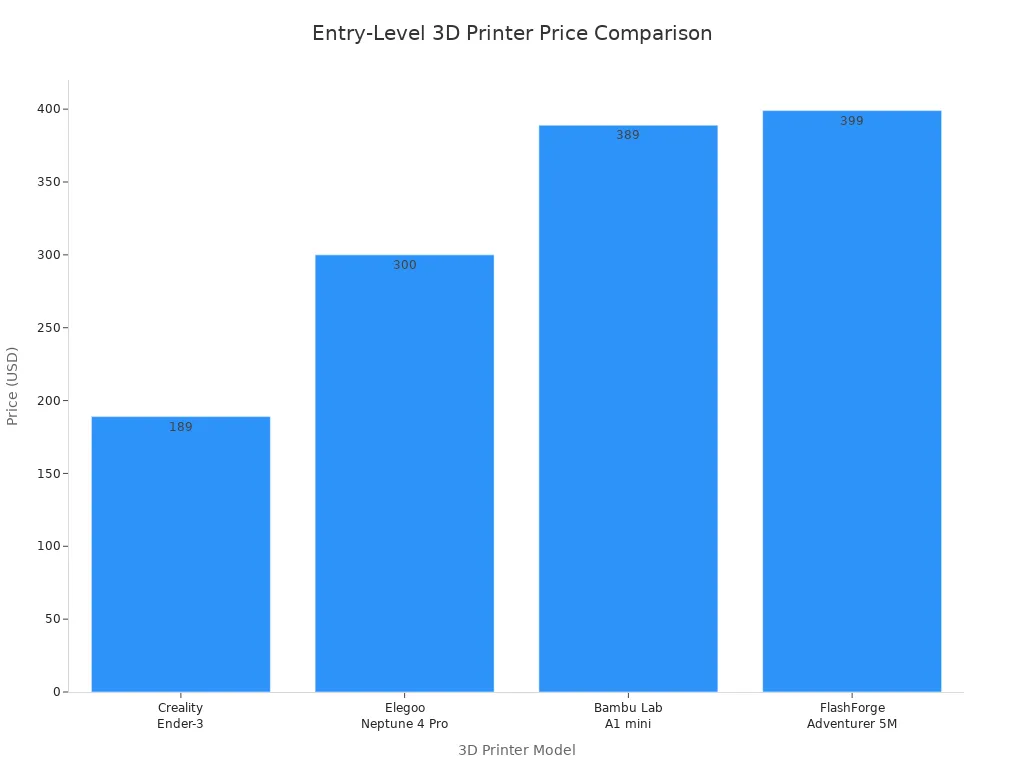
Affordable 3d printers help new users experience 3d printing without high costs. Choosing a budget 3d printer lets beginners start confidently.
Key Takeaways
- Budget 3D printers like the Creality Ender 3 V3 SE and Bambu Lab A1 Mini offer affordable entry points for beginners, making 3D printing accessible without high costs.
- Look for features such as auto bed leveling and user-friendly software to simplify setup and improve print quality, ensuring a smoother experience for first-time users.
- Active user communities provide valuable support and troubleshooting tips, helping beginners navigate challenges and enhance their 3D printing skills.
Why Choose Budget 3D Printers for Beginners
Key Benefits of Affordable 3D Printers
Budget 3d printers give beginners a practical way to explore 3d printing. These models keep costs low while offering reliable performance. Many users highlight the value of affordable 3d printers in reviews and expert analyses. The table below shows some of the most cited benefits:
|
Printer Model |
Benefits |
|---|---|
|
Phrozen Sonic |
High thermal stability, easy-to-use software, Wi-Fi/Ethernet access, long service life |
|
Wanhao Duplicator 8 |
High precision, professional quality, user-friendly for beginners, suitable for various applications |
|
Phrozen Shuffle 2019 |
Best price-performance ratio, exceptional reliability, consistency, and print accuracy |
Affordable 3d printers often include features that make them easy to use. Many models offer auto bed leveling and intuitive software. These features help users avoid common setup problems and achieve good print quality. Active user communities also provide support, sharing troubleshooting tips and experiences.
What Makes a 3D Printer Beginner-Friendly
A budget 3d printer becomes beginner-friendly when it includes features that simplify the setup and printing process. Experts look for the following criteria:
- Auto bed leveling and touchscreen controls for easier setup
- Low noise levels and built-in safety features for shared spaces
- Strong community support for troubleshooting and guidance
- Application and accuracy requirements that match user needs
- Build size and material compatibility for different projects
- Low maintenance and recurring costs
The best budget 3d printer for beginners combines ease of use, reliable features, and good print quality. These qualities help new users start their 3d printing journey with confidence.
Best Budget 3D Printers Under $500
Creality Ender 3 V3 SE: Best Budget 3D Printer
Creality Ender 3 V3 SE stands out among best budget 3d printers for its combination of affordability and advanced features. Many users choose this model because it offers good print quality and easy setup. The printer includes auto bed leveling, which helps beginners achieve a perfect first layer without manual adjustments. The Sprite Direct Extruder supports a wide range of filaments, including flexible materials like TPU. The sticky print bed uses a removable PC-coated stainless steel sheet, making it simple to remove finished prints.
|
Specification |
Detail |
|---|---|
|
Build Volume |
220220250 mm |
|
Typical Printing Speed |
180mm/s |
|
Max. Printing Speed |
250mm/s |
|
Acceleration |
2500mm/s² |
|
Printing Accuracy |
±0.1mm |
- Sprite Direct Extruder provides reliable extrusion for various filament types.
- Automatic bed leveling simplifies the printing process for beginners.
- Sticky print bed improves adhesion and makes print removal easier.
Creality Ender 3 V3 SE delivers best value 3d printers performance for those new to 3d printing. The build quality and durability of this inexpensive 3d printer make it a popular choice for classrooms and hobbyists.
Bambu Lab A1 Mini: Affordable and Easy to Use
Bambu Lab A1 Mini offers affordable 3d printers technology with a focus on user-friendly interfaces. This model includes advanced bed-leveling technology, which ensures a perfect first layer every time. Automatic filament flow rate tuning prevents common print quality issues, making the printer accessible for beginners. The software is simple and intuitive, allowing users to start printing quickly.
|
Feature |
Description |
|---|---|
|
Advanced Bed-Leveling Technology |
Ensures a perfect first layer every time, reducing the need for user adjustments. |
|
Automatic Filament Flow Rate Tuning |
Adjusts filament flow automatically, preventing common print quality issues. |
|
User-Friendly Software |
Simplifies the printing process, making it accessible for beginners. |
|
Timelapse Recording |
Allows users to record their prints with a built-in camera. |
|
Remote Monitoring |
Enables users to watch prints from their smartphones. |
|
WiFi Connectivity |
Facilitates sending print jobs wirelessly, a feature typically found in more expensive models. |
Customer reviews highlight the ease of use of the Bambu Lab A1 Mini. Users appreciate the pre-squared and pre-tuned design, which reduces setup time. The touch-screen interface provides clear instructions, making maintenance and operation straightforward. The printer also includes features that help prevent clogs and jams, which increases accessibility for non-technical users.
Bambu Lab A1 Mini ranks among the best cheap 3d printers for beginners who want affordable and reliable results. The combination of auto bed leveling and user-friendly interfaces makes it a strong contender for those seeking budget-friendly 3d printers.
Elegoo Neptune 4: Reliable Budget 3D Printer
Elegoo Neptune 4 offers reliable performance and good print quality at a competitive price. Many users select this model for its advanced features and consistent results. The Neptune 4 Pro uses a dual-geared direct drive extruder, which provides precise extrusion and supports a variety of filament types. The advanced cooling system helps maintain print quality, even during longer projects.
|
Feature |
Elegoo Neptune 4 Pro |
Creality Ender 3 V3 KE |
|---|---|---|
|
250 mm/s |
300 mm/s |
|
|
Maximum Print Speed |
500 mm/s |
500 mm/s |
|
Extruder Type |
Dual-geared direct drive |
N/A |
|
Cooling System |
Advanced cooling system |
N/A |
- Dual-geared direct drive extruder ensures accurate filament feeding.
- Advanced cooling system maintains consistent print quality.
Elegoo Neptune 4 stands out among budget 3d printers for its build quality and durability. The printer’s features make it suitable for beginners who want to explore 3d printing with minimal hassle.
Flashforge Adventurer Series: User-Friendly Option
Flashforge Adventurer Series provides a user-friendly option for families, classrooms, and beginners. The plug-and-play setup allows users to start printing quickly, with minimal assembly required. The series includes auto bed leveling, which simplifies the process and ensures good print quality. The PEI flex sheet build plate makes it easy to remove completed prints.
|
Feature |
Description |
|---|---|
|
Safety |
Safe for kids to be around |
|
Quiet |
Operates quietly, allowing for teaching or working while printing |
|
Economical |
Reasonably priced, suitable for families with multiple printers |
|
Ease of Use |
Plug-and-play setup, minimizing time spent on assembly and maintenance |
|
Self Leveling |
Simple one-button leveling process |
|
Build Plate |
PEI flex sheet for easy removal of completed prints |
|
Camera |
Built-in camera for monitoring prints remotely |
|
Enclosed |
Features a HEPA filter for safety and cleanliness around kids and pets |
|
Speed |
Prints at speeds up to 600mm/second, significantly faster than standard models |
Expert reviews praise the Adventurer Series for its built-in instructions and troubleshooting guides. The responsive touchscreen and improved design make it accessible for first-time users. The click-in, click-out nozzle allows users to experiment with different print qualities easily. Assisted mesh leveling guides users through setup, and automatic time-lapse mode adds a fun element to the printing process.
Flashforge Adventurer Series ranks among the best budget 3d printer choices for those seeking affordable, easy setup, and good print quality. The combination of safety, speed, and user-friendly features makes it one of the best value 3d printers for beginners.
Comparison Table: Top Affordable 3D Printers
When comparing affordable 3d printers, buyers often look for several important features. These features help users decide which model best fits their needs. The most important metrics include:
- Price: The initial cost matters most for many first-time buyers.
- Ease of Use: Simple assembly and operation make a big difference for beginners.
- Print Quality: Users want good print quality for their projects.
- Build Volume: A larger build area allows for bigger or multiple prints.
- Material Compatibility: Support for different filaments, such as PLA or PETG, increases versatility.
- Community and Support: Access to online resources and active communities helps users solve problems quickly.
The table below compares top budget 3d printers under $500. Each model offers unique strengths for those starting their 3d printing journey.
|
Model |
Price |
Build Volume (mm) |
Ease of Use |
Print Quality |
Material Compatibility |
Community & Support |
|---|---|---|---|---|---|---|
|
Creality Ender 3 V3 SE |
$189 |
220 x 220 x 250 |
Auto bed leveling |
High |
PLA, PETG, TPU |
Strong |
|
Bambu Lab A1 Mini |
$389 |
180 x 180 x 180 |
Intuitive software |
High |
PLA, PETG |
Growing |
|
Elegoo Neptune 4 |
$300 |
225 x 225 x 265 |
Simple interface |
High |
PLA, PETG, ABS |
Active |
|
Flashforge Adventurer 5M |
$399 |
220 x 220 x 220 |
Plug-and-play |
High |
PLA, PETG, ABS |
Supportive |
Tip: Beginners should consider not only the price but also the available support and material options. A strong community can help solve common issues and improve the 3d printing experience.
Each of these 3d printers provides reliable performance and supports a range of materials. Users can expect good print quality and easy operation, making these models excellent choices for anyone new to 3d printing.
How to Choose the Right Budget 3D Printer
Essential Features for Beginners
Selecting the right budget 3d printer starts with understanding which features matter most. Beginners should look for reliability and ease of use. Community support helps users solve problems quickly. Straightforward bed leveling and intuitive calibration procedures make setup easier. Accessible firmware and community-made tutorials provide extra guidance. Auto bed leveling stands out as a feature perfect for beginners, reducing frustration during setup and improving print quality.
- Reliability
- Ease of use
- Community support
- Straightforward bed leveling
- Intuitive calibration procedures
- Accessible firmware and tutorials
Common Mistakes to Avoid
Many first-time buyers make mistakes when choosing budget 3d printers. Some go too cheap or too fancy, missing out on models that balance features and value. Ultra-budget printers often need frequent adjustments, while high-end models may overwhelm beginners. Underestimating the setup process leads to frustration. Setting up a 3d printer involves calibration, leveling, and slicing. Ignoring safety can cause problems, especially with hot components or resin materials.
- Choosing a printer that is too cheap or too advanced
- Underestimating setup and calibration
- Ignoring safety precautions
Tips for First-Time Buyers
Experienced users recommend several tips for those new to 3d printing. Automatic bed leveling simplifies setup and improves results. Consider build volume to match project needs. An enclosure helps maintain temperature stability and safety. Good software and community support make troubleshooting easier. Regular maintenance, including cleaning and lubrication, extends printer life. Assess total cost of ownership, including materials and upgrades.
"I own a Creality Ender 3. I got the very bottom end model for $179 on sale at the time. The only real upgrade I have done on it is to add a glass bed. It has been more than adequate for what I have done with it."
Useful troubleshooting resources include guides for identifying and solving common problems and improving print quality.
|
Feature |
Description |
|---|---|
|
User-friendly interface |
Simple controls help beginners start quickly. |
|
Automatic calibration |
Easy leveling improves print success. |
|
Affordability |
Low prices make 3D printing accessible. |
|
Compact design |
Fits well in small spaces. |
|
Wi-Fi connectivity |
Allows remote monitoring and control. |
New users should match printer features to their project needs. Affordable models with reliable setups help beginners succeed. Many find support through platforms like Thingiverse, Reddit, and Discord, where users share tips and troubleshooting advice.
Affordable 3D printers offer user-friendly setups and decent print quality, making them a smart choice for first-timers.
FAQ
What materials do budget 3D printers support?
Most budget 3D printers support PLA and PETG. Some models also print with ABS and TPU. Users should check the printer’s specifications for compatibility.
How long does it take to set up a beginner 3D printer?
Setup usually takes 30 to 60 minutes. Clear instructions and auto bed leveling help users start printing quickly.
Can users find help if they have problems with their printer?
Many brands offer online guides and active user communities. Users can ask questions and share solutions on forums like Reddit or Discord.
