

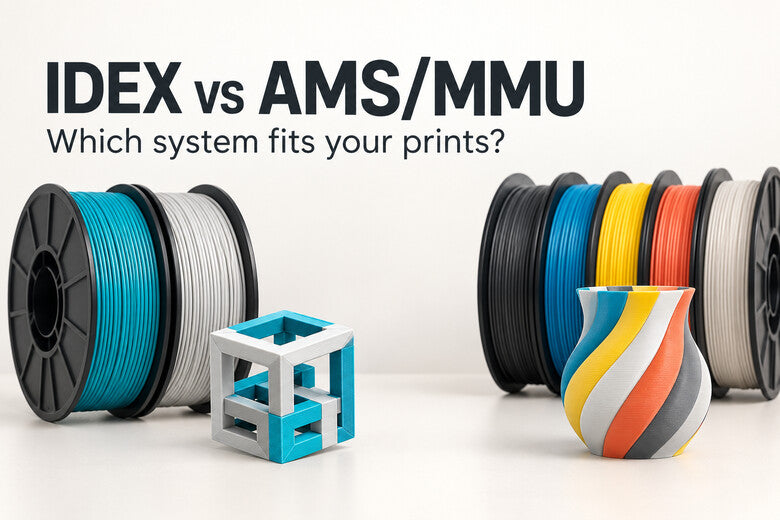
“IDEX or AMS?” sounds like a simple buying question, but it mixes two different ideas. IDEX describes a printer with two independently moving printheads. AMS/MMU-style systems describe automatic filament selection: several spools take turns feeding a printhead, often through one shared nozzle. The names alone cannot tell you which print will be quicker, cleaner, or cheaper.
The useful question is what you print most often: two-color functional parts, models with many colors, soluble support interfaces, or pairs of identical parts. Here is a practical way to choose, with the important exception that an IDEX machine can also be combined with a tool changer or another feeding system.
The short answer
- Choose a conventional two-head IDEX machine when you mainly use two colors or materials, value separate melt paths, or want supported duplication and mirror modes.
- Choose a single-nozzle AMS/MMU-style setup when easy access to several preloaded colors matters more than avoiding the purge and loading steps at every switch.
- Look beyond the basic two-way comparison when you need more than two separate melt paths. A tool-changing hybrid may combine IDEX movement with more dedicated tools, but its real capabilities depend on the particular machine and slicer.
There is no universal winner. Print frequency, color-change count, material compatibility, space, and maintenance all change the answer.
What do IDEX, AMS, and MMU actually mean?
An IDEX printer has two independently positioned extruder carriages. In a typical two-head configuration, each head has its own loaded filament and hotend. One head can park while the other prints. When properly supported by the printer and slicer, the two heads can also work on separate objects in duplication or mirror mode.
AMS is Bambu Lab's name for its Automatic Material System. MMU commonly refers to Prusa's Multi Material Upgrade. They are distinct products with different feeding and waste-management details; neither term describes every feeder on the market. In the common single-nozzle arrangement discussed here, a selector sends one filament at a time into the same melt path. Switching normally includes unloading, feeding the next filament, and removing old material from the nozzle.
A conventional IDEX printer is not automatically a seven-color tool changer, and a feeder is not a second independent printhead. Some modern printers combine these ideas, so check the actual hotend and motion architecture rather than relying on a product label.

Five questions that make the choice easier
1. How many colors do you use in the same layer?
A standard two-head IDEX setup usually gives you two loaded tools. That is enough for a two-color logo, a model-and-support combination, or parts that need two distinct nozzle setups. It is not the simplest route to a five-color character unless the machine has additional supported tools or another filament-changing mechanism.
A compatible AMS/MMU arrangement may keep more spools ready, depending on its model and printer. That can be convenient for decorative prints with several colors. But spool slots are not the same as independent hotends: a model that alternates colors many times can still make the shared nozzle repeat the whole switching cycle.
2. How often does the file switch colors?
The number of changes matters more than the number of spools on the rack. A two-color sign with one change per layer behaves differently from a tiny patterned figure that switches several times within each layer.
With IDEX, the printer parks one head and selects the other. Separate melt paths avoid flushing the previous color from inside a shared nozzle. The parked nozzle may still ooze, and the slicer may use a small priming or wiping structure.
With a single-nozzle feeder, the printer unloads the old filament, loads the new one, purges remaining color, and stabilizes flow. The exact time and material use depend on the printer, filament path, color pair, temperature changes, and slicer settings. MMU3's compact wipe tower and wipe-to-infill or wipe-to-object options, for example, aim to reduce the material spent on these transitions.

3. Do you need different materials, or just different colors?
Two dedicated hotends can use different nozzle temperatures and keep the materials out of each other's internal melt path. That is useful for a support interface or two filaments that leave visible traces when mixed. It does not mean any pair of materials will bond well: both still share the bed, surrounding air, cooling conditions, and the contact surface in the finished part.
A shared nozzle has to handle each material in turn. If the two materials require very different temperatures or one leaves difficult residue, transitions need more care. Check the exact feeder's filament and spool compatibility as well as the printer profile. Test a small interface before committing to a long print.
4. Will you print two copies or mirrored parts?
This is the clearest use case that the architectures do not share. Some IDEX printers offer duplication mode, where two heads produce matching parts at once, and mirror mode, where they make left- and right-hand counterparts. The objects must fit within the usable areas and the mode must be supported by the machine and slicer.
An AMS/MMU feeder by itself cannot give a single printhead a second independently moving carriage. You can still place two objects on the bed, but one nozzle prints them sequentially as it travels. Neither IDEX mode automatically doubles real-world output; compare the actual job time, usable width, and failure risk.
5. Which maintenance work fits your setup?
With a typical IDEX machine, inspect both nozzles, tool offsets, parked-head clearance, and any wiping areas. Poor XY or Z alignment can leave a seam, gap, or collision even when each color extrudes correctly.
With a single-nozzle feeder, there is only one nozzle position to align, but you must keep the spool path, buffers, selector, sensors, and loading tips working reliably. A filament jam affects the shared path. These are different maintenance jobs, not a simple “one system needs maintenance and the other does not” choice.

Three example jobs
A two-color functional enclosure
If its logo or label appears on many layers, a two-head IDEX system can avoid repeated shared-nozzle flushing. Check how well the two heads align and whether any priming structure is needed. A well-tuned feeder can still be a sensible choice if you value simpler hardware or already own it.
A five-color decorative figurine
A compatible multi-spool feeder gives easy access to the colors without manually changing rolls. Inspect the number of switches in the preview: a small figure with frequent color changes may spend much of its time on transitions. A basic two-head IDEX setup cannot use five simultaneously loaded colors without extra supported hardware.
Pairs of left- and right-hand brackets
An IDEX machine with supported mirror mode can make the pair in one coordinated job. Check each half's available build area and the orientation of the real loads. An AMS/MMU system has no corresponding second carriage, though it can still print the two objects in a conventional job.
Where does the Sovol M1D fit?
The Sovol M1D uses a DualX hybrid architecture: one fixed toolhead plus six automatically interchangeable toolheads. It is designed for up to seven colors or materials and also supports Copy and Mirror modes. This goes beyond the two loaded heads of a conventional IDEX comparison while retaining independent tool paths for multicolor tasks.
Its “near-zero purge waste” description refers to avoiding much of the shared-nozzle flushing. It does not promise that every print needs no priming, wiping, skirt, or other auxiliary material. As with any machine, check the exact mode, material combination, tool calibration, and sliced job before assuming a particular saving.
How to compare two machines fairly
- Use your own models. Slice a simple two-color part, a change-heavy multicolor model, and a representative production job.
- Keep quality targets comparable. Match nozzle size, layer height, material class, and visible surface expectations as closely as practical.
- Record the actual switches. Note every filament change or head change, not just the count of distinct colors.
- Read the full estimates. Include purge, tower, priming, supports, travel, and material loaded into the objects.
- Check usable space in each mode. Duplication and mirror modes may reduce the area available to each part.
- Price the ongoing work. Consider spare nozzles or tools, feeder maintenance, calibration time, and failed prints.
The slicer estimates are predictions, not guaranteed results. A small trial print can reveal ooze, color contamination, support adhesion, or a calibration issue before an overnight project.
Common mistakes
- Calling every multi-spool box an AMS: use the name for the actual product; feeder designs and compatibility differ.
- Calling every dual-nozzle machine IDEX: independent carriage motion is the defining feature.
- Assuming IDEX means unlimited colors: count the real loaded hotends and any supported additional tools.
- Assuming separate nozzles mean zero waste: priming and wiping may still be needed.
- Comparing only the change action: use the complete sliced job, including movement and temperature behavior.
- Ignoring materials outside the nozzles: bed temperature, cooling, and bonding still matter.
- Expecting duplication mode from a feeder: it requires independent printhead motion, not merely multiple spools.
FAQ
Is IDEX always faster than AMS or MMU?
No. Frequent changes may favor separate melt paths, while a job with few switches may show little difference. Calibration, travel, priming, and print geometry also affect the result. Compare complete sliced jobs.
Does IDEX always make cleaner color boundaries?
Separate hotends avoid internal color mixing, but head offsets and parked-nozzle ooze can still mark a boundary. A carefully calibrated shared-nozzle system can produce clean colors after sufficient purging.
Can AMS or MMU print more colors than IDEX?
Often more than a conventional two-head IDEX setup, depending on the feeder and printer combination. A hybrid IDEX tool changer may support more dedicated tools, so compare actual configurations.
Can an AMS/MMU system use different materials?
Some combinations are supported, but check the feeder's material rules and the shared nozzle's temperature and purge requirements. All materials in the same object must also work together on the bed and at their contact surfaces.
Is a purge tower always required for IDEX?
No universal rule applies. Some independent-hotend jobs work with little or no tower; others use a prime structure to stabilize flow or handle ooze. Follow the machine profile and verify with a small test.
Which is easier for a beginner?
A well-integrated single-nozzle feeder may feel simpler if the goal is several decorative colors. If the goal is two materials or repeated pairs, an IDEX workflow can be more useful. Setup and maintenance differ by model, so look at the entire ecosystem.
Conclusion
For multicolor printing, IDEX and AMS/MMU solve different problems. Conventional IDEX gives two independently moving heads and separate melt paths, which is useful for two-color parts, support interfaces, and supported copy or mirror work. A single-nozzle feeder keeps several filaments ready and can be convenient for colorful designs, while each switch must pass through the shared-nozzle change process.
Choose from your own files: count changes, inspect purge and priming, check usable area, and test the materials you intend to combine. If you need both IDEX production modes and more dedicated colors, evaluate a hybrid tool-changing architecture rather than assuming the choice ends at two heads or one nozzle.

Explore the hybrid option
Meet the Sovol M1D
Want IDEX Copy and Mirror modes alongside more than two dedicated color paths? DualX combines one fixed toolhead with six automatically interchangeable toolheads, for up to seven colors or materials in a supported print.
Explore Sovol M1D →View current configurations, availability, and pre-order details on the product page.
