






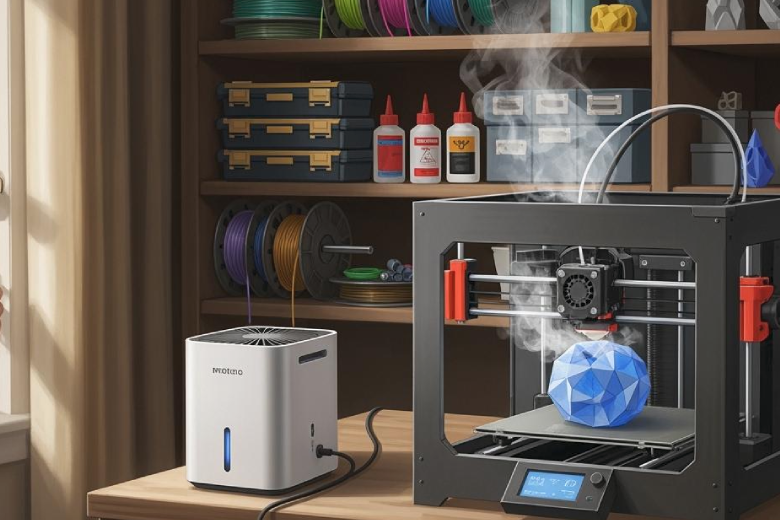
The 3d print smell often raises questions about safety and health. This smell comes from heating filaments, which release various emissions into the air. The 3d print smell can differ based on the filament used. PLA produces much less 3d print smell and emissions than ABS or Nylon, which generate strong 3d printing odour and potentially harmful chemicals. 3d printing smell and 3d printing odour can become intense, especially in small rooms. Poor ventilation allows the smell to linger, increasing exposure. Good ventilation helps lower the 3d print smell and reduces discomfort. Practical steps exist to make the 3d print smell less noticeable and safer for everyone.
Remember, the type of filament and the level of ventilation can greatly impact the 3d print smell and its effects.
Key Takeaways
- 3D printing releases odors and tiny particles that can affect your health, especially in small or poorly ventilated rooms.
- Different filaments produce different smells and emissions; PLA and PETG are safer with milder odors, while ABS emits stronger, more harmful fumes.
- Good ventilation, such as opening windows or using exhaust fans, helps reduce odors and protects your lungs from harmful particles.
- Using printer enclosures, air purifiers with HEPA filters, and choosing low-emission filaments can make your 3D printing safer and more comfortable.
- Watch for symptoms like headaches, dizziness, or throat irritation during printing and take action by improving airflow or stopping printing if needed.
Causes of 3D Print Smell
Why 3D Printing Smells
3D printing relies on heating thermoplastic filaments or resin to high temperatures. This process causes the materials to break down and release volatile organic compounds (VOCs) and ultrafine particles into the air. The chemical reactions that occur during heating are responsible for the distinct odors associated with 3D printing. For example, when ECTFE filament is heated, small amounts of hydrogen fluoride (HF) can form. This results from the breakdown of the fluoropolymer structure, which produces a sharp, chemical smell. Proper ventilation is essential in these cases because some of the released compounds can be hazardous if inhaled over time.
Tip: Always operate your 3D printer in a well-ventilated area to minimize exposure to fumes and odors.
Filament Types and Odors
The intensity and character of 3D printing odors depend heavily on the type of filament used. Different materials produce unique smells due to their chemical makeup and the byproducts released during melting.
- ABS and ASA: These filaments emit a strong burnt plastic odor. Many users find this smell unpleasant and overwhelming, especially in confined spaces.
- PLA and PLA+: These materials give off a slightly sweet scent. While less offensive than ABS, the odor can still be unhealthy if inhaled in large amounts.
- PETG: Often described as nearly odorless, PETG is a popular choice for those sensitive to smells.
- Specialty Filaments: Some advanced materials, such as those containing fluoropolymers, can release specific chemicals like hydrogen fluoride, which require extra caution.
The odor intensity can also vary between brands, even for the same filament type. Manufacturers may use different additives or colorants, which can influence both the smell and the potential health risks.
|
Filament Type |
Typical Odor |
Health Concern Level |
|---|---|---|
|
ABS/ASA |
Burnt plastic, strong |
High |
|
PLA/PLA+ |
Slightly sweet |
Moderate |
|
PETG |
Odorless/neutral |
Low |
|
ECTFE |
Sharp, chemical |
High |
Understanding these differences helps users make informed choices about which materials to use and how to manage their printing environment safely.
3D Printer Fumes and EmissionWhat Are 3D Printer Fumes
3D printer fumes are a mix of gases and particles released when filaments or resins are heated during printing. These emissions include a range of substances that can affect air quality and health. The most common components are ultrafine particles, often called UFPs, and volatile organic compounds, or VOCs. UFPs are tiny particles that can enter the lungs and even reach the bloodstream. VOCs are gases that come from the breakdown of plastics and additives. Both UFPs and VOCs can cause irritation of the eyes, nose, and throat. Some fumes may also contain starting chemicals from incomplete polymerization, pigments, and decomposition products from heating.
Note: 3D printing emissions can cause headaches, dizziness, and irritation of the respiratory system, especially in poorly ventilated spaces.
Common substances found in 3D printer fumes:
- Ultrafine particles (UFPs)
- Volatile organic compounds (VOCs)
- Additives and pigments
- Decomposition products
- Styrene and chloromethyl (from certain filaments)
Emissions from Different Filaments
The type of filament used in 3D printing has a major impact on the emissions produced. PLA filaments, made from natural ingredients, emit lower levels of volatile organic compounds and UFPs compared to ABS or ASA. PLA’s emission rate is in the low single-digit microgram range per minute. In contrast, ABS and similar materials release higher concentrations of VOCs and UFPs, including toxic fumes like styrene. These emissions can lead to more severe health effects, such as nausea and irritation of mucous membranes. PETG and other specialty filaments may also emit UFPs and VOCs, but usually at lower levels than ABS.
Brand and Material Variations
Emissions can vary even within the same filament type. Different brands use unique additives, pigments, and manufacturing processes. Lower-quality filaments may contain more harmful additives, increasing the amount and toxicity of fumes and UFPs released. Even two spools of PLA from different brands can produce different levels of 3D printer fumes and emissions. Users should check for reputable brands that test and disclose their emission data. Choosing high-quality materials helps reduce exposure to harmful fumes and ultrafine particles.
Health Risks of 3D Printing Smell
Short-Term Effects
Odours from 3D printing can cause immediate health concerns, especially in spaces with poor ventilation. When printers heat filaments, they release chemicals and ultrafine particles into the air. These substances can irritate the eyes, nose, and throat. Many users report headaches, dizziness, and nausea after exposure to strong odour. Some people may also experience coughing or a scratchy throat. These reactions often occur when pollutant concentrations rise in small or enclosed rooms.
Note: Children and individuals with asthma or allergies may react more strongly to odours from 3D printers.
Short-term health risks increase if printers operate in rooms without proper airflow. Opening windows, using fans, or installing air purifiers can help reduce odour and improve indoor air quality.
Long-Term Exposure
Repeated or prolonged exposure to 3D printer odour can lead to more serious health issues. Scientific studies have linked chronic inhalation of certain emissions to respiratory problems and increased sensitivity to indoor air pollution. Over time, inhaling high levels of ultrafine particles and volatile organic compounds may contribute to lung irritation and other respiratory hazards. Some chemicals, such as styrene from ABS filaments, are classified as possible carcinogens.
Long-term health risks are higher in environments where ventilation is poor and odours persist. Users should avoid placing printers in bedrooms or children's rooms. It is important to keep the workspace well-ventilated and to monitor for any changes in odour intensity.
Common Symptoms
Recognizing the warning signs of overexposure to 3D printer odour is essential for maintaining health and safety. Typical symptoms include:
- Persistent headaches or dizziness
- Eye, nose, or throat irritation
- Coughing or shortness of breath
- Nausea or upset stomach
- Fatigue or difficulty concentrating
If these symptoms appear during or after printing, users should take immediate action to improve ventilation and reduce exposure to odours. Monitoring the workspace for changes in odour can help identify potential hazards early.
Safety Recommendations
To minimize health risks and odour hazards, consider the following safety measures:
- Do not place the 3D printer near flammable materials or heat sources.
- Avoid operating desktop printers in children's rooms.
- Ensure the room has good ventilation at all times.
- Install a smoke detector above the printer.
- Keep a foam fire extinguisher nearby.
- Store printing materials and spare parts securely.
- Protect filament spools from moisture.
- Supervise children around the printer to prevent burns.
Always prioritize ventilation and monitor odour levels to protect your health.
By understanding the effects of 3D printer odour and taking proactive steps, users can reduce health risks and create a safer printing environment.
Risky Filaments and Materials
PLA and Its Smell
PLA remains one of the most popular 3D printing materials. It is derived from renewable resources and is considered non-toxic under normal printing conditions. PLA emits a faint, sweet smell during printing, which most users find mild. However, printing large objects or operating multiple printers in a closed space can make the odor more noticeable and unpleasant. Scientific studies show that PLA releases millions of ultrafine particles, which are smaller than those from ABS. These tiny particles can penetrate deep into the lungs and even reach tissues, potentially causing cellular stress. While PLA is safer than many alternatives, users should still ensure good ventilation.
Tip: Even with PLA, always ventilate your workspace to minimize exposure to airborne particles.
ABS and Harmful Fumes
ABS is widely used for its strength and durability, but it poses significant health concerns. When heated, ABS releases a strong burnt plastic odor and emits harmful chemicals, including styrene vapors. Styrene is classified as a possible carcinogen and can cause headaches, nausea, and respiratory irritation. ABS also produces billions of ultrafine particles, which are larger than those from PLA but still hazardous. The combination of strong odor and high particle emissions makes ABS one of the riskiest filaments for indoor use.
PETG and Other Filaments
PETG offers a safer alternative for many users. It produces only a light, sweet smell during printing and does not emit toxic fumes. PETG’s emissions are much lower than those of ABS, making it suitable for use in home and educational environments. TPU, another common filament, is also considered non-toxic and safe for most users. Both PETG and TPU are preferred choices for those concerned about air quality.
- PETG: Light, sweet smell; low emissions; no toxic fumes
- TPU: Non-toxic; minimal odor
Specialty Filaments
Specialty filaments, such as those containing metals, carbon fibers, or advanced polymers, present unique risks. Scientific investigations reveal that these materials can emit a wide range of particles and chemicals, depending on their composition and printing temperature. Additives in specialty filaments may increase particle release and alter emission characteristics. Some specialty filaments require higher temperatures, which further raises the number of particles released. The toxicity of emissions from specialty filaments can vary, so users should always consult manufacturer guidelines and prioritize ventilation.
|
Filament Type |
Odor Strength |
Emission Risk |
|---|---|---|
|
PLA |
Mild, sweet |
Moderate |
|
ABS |
Strong, burnt |
High |
|
PETG |
Light, sweet |
Low |
|
Specialty (varied) |
Varies |
Varies |
Ventilation and Safety Tips
Creating a safe 3D printing environment requires a combination of technical solutions and good habits. Proper ventilation stands as the most effective way to reduce odors and limit exposure to emissions. This section outlines practical strategies to help users maintain a healthy workspace.
Improving Ventilation
Ventilation is the cornerstone of a safe 3D printing setup. Good airflow removes airborne particles and volatile organic compounds from the workspace. Natural ventilation, such as opening windows and doors, allows fresh air to circulate and dilute pollutants. Mechanical ventilation systems, including exhaust fans or ducted vents, further enhance air exchange and help maintain indoor air quality.
Tip: Position your 3D printer near a window or in a room with cross-ventilation to maximize the benefits of natural ventilation.
For best results, combine natural ventilation with mechanical solutions. This approach ensures that emissions do not accumulate, especially during long print jobs. Regularly check that ventilation systems function properly and keep vents unobstructed.
Using Air Purifiers
An air purifier can significantly improve indoor air quality during 3D printing. Devices equipped with HEPA and activated carbon filters capture ultrafine particles and absorb volatile organic compounds. Place the air purifier close to the printer for maximum effectiveness. Run the device throughout the printing process and for a period afterward to clear any lingering emissions.
Some advanced 3D printers include built-in filtration systems. These integrated solutions offer an extra layer of protection, especially in rooms where natural ventilation is limited. Always select an air purifier rated for the size of your workspace.
Choosing Low-Emission Filaments
Material selection plays a crucial role in minimizing emissions. PLA and PETG are widely recognized as low-emission filaments. These materials release fewer volatile organic compounds compared to ABS or Nylon. By choosing low-emission filaments, users can reduce the overall health risks associated with 3D printing.
|
Filament Type |
Emission Level |
Recommended Use |
|---|---|---|
|
PLA |
Low |
Home, schools, offices |
|
PETG |
Low |
General use |
|
ABS |
High |
Industrial settings |
|
Nylon |
High |
Specialized projects |
Switching to safer materials aligns with the substitution principle in workplace safety. This principle encourages replacing hazardous substances with less harmful alternatives whenever possible.
Printer Enclosures
Printer enclosures offer a practical way to contain emissions and improve safety. These structures surround the printer, trapping fumes and particles inside. Many enclosures feature built-in ventilation systems or ports for attaching external exhaust fans. Using an enclosure reduces the spread of pollutants into the room and makes it easier to manage air quality.
- Closed printing rooms with proper ventilation tend to have lower emissions.
- The design and materials of the enclosure influence its effectiveness.
- Regularly ventilate the enclosure and the surrounding area to prevent buildup of harmful substances.
Safe Printing Habits
Adopting safe printing habits further reduces exposure to emissions. Experts recommend following the STOP principle:
- Substitution: Choose low-emission filaments like PLA and PETG.
- Technical Measures: Use printer enclosures, ventilation systems, and air purifiers.
- Organizational Measures: Limit the time spent near the printer and avoid operating it in living spaces.
- Personal Measures: Wear protective equipment such as masks and gloves when handling filaments or maintaining the printer.
Additional safety tips include:
- Operate printers only in well-ventilated areas.
- Avoid printing in bedrooms, offices, or other living spaces.
- Store filaments in sealed containers to prevent moisture absorption.
- Clean the workspace regularly to remove dust and residue.
Safety authorities, such as those referenced in DGUV Information 213-033, recommend these measures to protect users from hazardous substances in 3D printing environments.
By combining proper ventilation, careful material selection, and safe habits, users can create a healthier and more comfortable 3D printing experience. These ventilation tips help ensure that emissions remain at safe levels and that the workspace supports long-term well-being.
When to Take Action
Warning Signs
Recognizing the early symptoms of overexposure to 3D printer fumes is essential for maintaining a safe workspace. Users should monitor their health during and after printing sessions. Common warning signs include:
- Persistent headaches that do not improve with rest
- Dizziness or lightheadedness while near the printer
- Irritation of the eyes, nose, or throat
- Coughing, wheezing, or shortness of breath
- Nausea or an upset stomach
- Unusual fatigue or difficulty focusing
These symptoms may develop gradually or appear suddenly, especially in rooms with poor ventilation. Children, individuals with asthma, or those with allergies may experience stronger reactions. If multiple people in the same area report similar symptoms, this often indicates a buildup of emissions.
Tip: If you notice a strong odor or visible haze in the air, stop printing and increase airflow immediately.
When to Seek Help
Some symptoms require prompt attention from a healthcare professional. Users should not ignore severe or persistent health issues. Seek medical help if you experience:
- Difficulty breathing or chest tightness
- Severe or worsening headaches
- Persistent coughing that lasts more than a day
- Eye irritation that does not resolve after leaving the area
- Symptoms that interfere with daily activities
Bring information about the materials used and the duration of exposure when consulting a doctor. This helps medical professionals provide accurate advice and treatment. If symptoms improve after increasing ventilation or leaving the area, continue to monitor your health and adjust your printing practices.
Note: Early intervention can prevent long-term health effects. Always prioritize safety and act quickly if you suspect overexposure.
3D printing releases volatile organic compounds and fine dust particles. ABS filaments can emit styrene, which may irritate the respiratory system, eyes, and skin. PET-G and PLA are safer options, producing fewer harmful compounds. Using printer covers with HEPA filters and maintaining proper ventilation reduces exposure to odors and particles.
- Choose safer filaments like PET-G or PLA.
- Consider a printer cover with a HEPA filter.
- Keep the printing area well-ventilated.
With these precautions, 3D printing remains a safe and rewarding activity for hobbyists and professionals.
FAQ
What causes the strong smell during 3D printing?
Heating filament releases volatile organic compounds and ultrafine particles. These substances create the characteristic odor. The smell intensity depends on the filament type and the printing temperature.
Is it safe to 3D print indoors?
Printing indoors is safe with proper ventilation. Use air purifiers and enclosures to reduce exposure. Avoid printing in bedrooms or small, closed spaces.
Which filament produces the least odor?
PLA and PETG filaments produce the least odor and emissions. These materials are suitable for home and classroom use. Always check for reputable brands.
Can I use a regular fan to ventilate my workspace?
A regular fan helps move air but does not filter harmful particles. Combine fans with open windows or use HEPA air purifiers for better protection.
What should I do if I feel sick while printing?
Stop printing immediately. Move to fresh air. Increase ventilation in your workspace. If symptoms persist, consult a healthcare professional.
