



Viele Menschen möchten bei 3D-Druckprojekten Geld sparen. Oftmals stellen sie fest, dass sich die Kosten für den 3D-Druck schnell summieren, egal ob es sich um kleine Modelle oder große Bauteile handelt.
- Der durchschnittliche Kosten von 3D-Druckprojekten Die Preise reichen von 1 Dollar für kleine Objekte bis zu Tausenden für kommerzielle Aufträge.
- Die Kosten pro Stunde für 3D-Druckdienstleistungen liegen üblicherweise zwischen 1 und 3 US-Dollar. Praktische Tipps können helfen, die Kosten für den 3D-Druck zu senken, ohne die Qualität zu beeinträchtigen. Fallstudien zeigen, dass kluge Entscheidungen die Kosten senken können. Kosten um bis zu 75 % senken, 3D-Druck wird dadurch für Hobbyisten und Profis erschwinglicher.
Wichtigste Erkenntnisse
- Wählen Sie kostengünstige Filamente wie PLA und ABS, um Geld zu sparen und gleichzeitig die Qualität Ihrer 3D-Drucke zu erhalten.
- Verwenden Sie für nicht kritische Teile recycelte oder kostengünstigere Materialien, um die Kosten deutlich zu senken. Beachten Sie jedoch mögliche Qualitätseinbußen.
- Optimieren Sie Ihre 3D-Druckeinstellungen, wie z. B. Schichthöhe und Fülldichte, um Materialverschwendung und Energieverbrauch zu reduzieren.
Materialien zur Senkung der 3D-Druckkosten
Kostengünstige Filamente auswählen
Die Wahl des richtigen Filaments spielt eine entscheidende Rolle bei der Kostenkontrolle im 3D-Druck. Man sollte verschiedene Filamenttypen und Preise vergleichen, um für jedes Projekt das beste Preis-Leistungs-Verhältnis zu finden. PLA und ABS sind oft kostengünstige Optionen für die meisten Hobbyanwender und Profis. Diese Filamente bieten zuverlässige Leistung zu geringeren Kosten als Spezialmaterialien.
Eine einfache Tabelle kann Benutzern helfen, die Preisunterschiede zwischen gängigen 3D-Druckmaterialien:
| | Preis |
|---|---|
| NylonX Carbonfaser PA12 Filament (3kg) | 362,00 $ (339,37 $ bei Abnahme größerer Mengen) |
| NinjaTek Cheetah Midnight Black TPU (2kg) | 192,88 $ |
| Schwarzes NylonG-Glasfaserfilament (3 kg) | 329,00 € |
Er oder sie sollte auch die mechanischen Anforderungen des Drucks berücksichtigen. FDM-Filamente wie PLA und ABS eignen sich gut für den allgemeinen Gebrauch, während Spezialfilamente wie Kohlefaser oder flexibles TPU teurer sind. Die Wahl des richtigen Filaments für den jeweiligen Zweck verbessert die Kosteneffizienz und hilft, Geld zu sparen.
Verwenden Sie recycelte oder kostengünstige Materialien
Viele Anwender suchen nach Möglichkeiten, die Kosten für 3D-Druckmaterialien zu senken. Recycelte Filamente und günstigere Alternativen können zwar helfen, die Kosten zu reduzieren, bringen aber auch Nachteile mit sich.
Nutzerbewertungen und Labortests zeigen mehrere wichtige Punkte auf:
- Recyceltes Filament kann Verunreinigungen enthalten. und ungleichmäßiger Durchmesser, was die Druckqualität beeinträchtigen kann.
- Durch die Verwendung von Recyclingmaterialien lassen sich die Kosten deutlich senken, allerdings kann die Druckqualität nach einem zweiten Druckvorgang um etwa 25 % abnehmen.
- Recyceltes PLA kann als Alternative zu neuem PLA dienen, wenn die Hersteller seine Eigenschaften kontrollieren.
Man sollte die Kostenersparnis gegen den potenziellen Qualitätsverlust abwägen. Für unkritische Teile oder Prototypen ist recyceltes Filament eine kostengünstige Option. Für funktionale oder detailreiche Drucke kann neues Filament bessere Ergebnisse liefern.
Quellenmaterialien intelligent nutzen
Intelligente Beschaffungsstrategien helfen Anwendern, die Kosten von 3D-Druckprojekten zu kontrollieren. Großeinkäufe und Lieferantenmarktplätze bieten Möglichkeiten, Kosten zu senken und eine stetige Versorgung mit 3D-Druckmaterialien sicherzustellen.
Die folgende Tabelle hebt hervor bewährte Verfahren zur Materialbeschaffung:
| Bewährte Vorgehensweise | Beschreibung |
|---|---|
| Großeinkauf | Verhandeln Sie Quartalsverträge über Amazon Business mit Rabatten von 15-25%. |
| Lieferantenmarktplätze | Nutzen Sie Plattformen wie Amazon für gleichbleibende Qualität und wettbewerbsfähige Preise. |
| Redundanz durch zwei Lieferanten | Schaffen Sie Redundanz bei kritischen Materialien, um die Versorgungssicherheit zu gewährleisten. |
Großeinkäufe führen oft zu niedrigeren Kilogrammpreisen, insbesondere bei häufig verwendeten Filamenten. Man sollte verschiedene Anbieter vergleichen und auf vertrauenswürdigen Plattformen nach Angeboten suchen. Der Aufbau von Geschäftsbeziehungen mit mehreren Lieferanten hilft, Engpässe zu vermeiden und die Kosten planbar zu halten.
Tipp: Prüfen Sie immer die Ebenheit des Druckbetts und verwenden Sie hochwertiges, trockenes Filament. So vermeiden Sie Fehldrucke und Materialverschwendung, was die Kosten erhöhen kann.
Die Wahl kostengünstiger Filamente, die Verwendung von Recyclingmaterialien oder preiswerten Alternativen sowie eine intelligente Materialbeschaffung tragen dazu bei, die Kosten des 3D-Drucks zu senken. Diese Strategien ermöglichen es Anwendern, den Nutzen zu maximieren und unnötige Ausgaben zu vermeiden.
Optimieren Sie die 3D-Druckeinstellungen, um Geld zu sparen
Die Feinabstimmung der 3D-Druckeinstellungen kann die Kosten von 3D-Druckprojekten erheblich beeinflussen. Durch die Anpassung der Druckerparameter können Anwender Materialverschwendung reduzieren, den Energieverbrauch senken und die Gesamtqualität ihrer Drucke verbessern. Diese Strategien helfen sowohl Hobbyanwendern als auch Profis, Geld zu sparen und gleichzeitig die Qualität zu erhalten.
Schichthöhe und Geschwindigkeit anpassen
Schichthöhe und Druckgeschwindigkeit spielen eine entscheidende Rolle für die Effizienz von 3D-Druckverfahren. Eine geringere Schichthöhe erhöht zwar die Druckgenauigkeit, verlängert aber auch die Druckzeit und kann zu einem höheren Stromverbrauch führen. Eine höhere Druckgeschwindigkeit hingegen beschleunigt den Druckvorgang, kann jedoch die Oberflächenqualität beeinträchtigen.
- Geringere Schichthöhen verbessern die Detailgenauigkeit Dies führt jedoch zu längeren Druckzeiten.
- Eine Verringerung der Fülldichte beschleunigt den Druckvorgang, kann aber die Festigkeit des Objekts beeinträchtigen.
- Das Ausbalancieren dieser Einstellungen ist entscheidend für einen kostengünstigen und effizienten 3D-Druck.
Durch die Wahl der richtigen Kombination aus Schichthöhe und Geschwindigkeit können Anwender die Kosten des 3D-Drucks optimieren, ohne Kompromisse bei der Qualität einzugehen. Viele 3D-Drucker bieten voreingestellte Profile, die Anwendern helfen, dieses Gleichgewicht schnell zu finden.
Tipp: Testen Sie verschiedene Einstellungen an kleinen Modellen, bevor Sie größere Projekte beginnen. So finden Sie das optimale Verhältnis zwischen Druckqualität und Kosten.
Minimierung der Füllung und Wandstärke
Die Einstellungen für Füllung und Wandstärke haben einen direkten Einfluss auf den Materialverbrauch und die Festigkeit des Drucks. Durch die Feinabstimmung dieser Parameter können Anwender Kosten sparen und gleichzeitig langlebige Bauteile herstellen.
- Durch Anpassung der Fülldichte wird optimiert Die Stärke und das Gewicht eines Drucks.
- Die Wahl der richtigen Wandstärke gewährleistet Festigkeit und Langlebigkeit.
Designstrategien zur Senkung der 3D-Druckkosten
Nutzen Sie kostenlose oder kostengünstige CAD-Software
Die Wahl der richtigen Software ist ein entscheidender Schritt zur Senkung der 3D-Druckkosten. Viele kostenlose oder kostengünstige CAD-Tools bieten leistungsstarke Funktionen für 3D-Design. Diese Programme helfen Anwendern, hohe Anschaffungskosten zu vermeiden und dennoch qualitativ hochwertige Modelle zu erstellen.Die folgende Tabelle vergleicht gängige Optionen:
| Software | Hauptmerkmale | Am besten geeignet für | Kostenart |
|---|---|---|---|
| Craftcloud | CAM, Zusammenarbeit, Cloud-Funktionen | Nichtkommerzielle Projekte | Kostenlos für Studierende/Lehrkräfte |
| SketchUp kostenlos | Webbasierte, 10 GB Speicherplatz, 3D Warehouse | Architektur, Landschaftsgestaltung | Kostenlos für Schulen |
| Onshape | Live-Zusammenarbeit, robuste Entwicklungswerkzeuge | Mechanische Teile, komplexe Objekte | Kostenlos für berechtigte Nutzer |
| Vektier | Echtzeit-Rendering, 3D-Assets | Künstler, Erfahrung im 2D-Design | Kostenlos für die kommerzielle Nutzung |
| FreeCAD | Open-Source-, parametrische Modellierung | Allgemeine CAD-Aufgaben | Kostenlos für alle |
| Solid Edge | Simulation, 3D-Druckfunktionen | Mechanische/elektrische Konstruktion | Kostenlos für Schüler/Lehrer |
| Mixer | Modellieren, Bildhauen, Rendern | | Kostenlos für alle |
| OpenSCAD | Parametrische, codebasierte Benutzeroberfläche | Programmierer | Kostenlos für alle |
| NanoCAD | Zeichen-/Konstruktionswerkzeuge | Fortgeschrittene Benutzer | Kostenlos für alle |
| LibreCAD | Leichtgewichtiges 2D-CAD, plattformübergreifend | Grundlegende 2D-Modellierung | Kostenlos für alle |
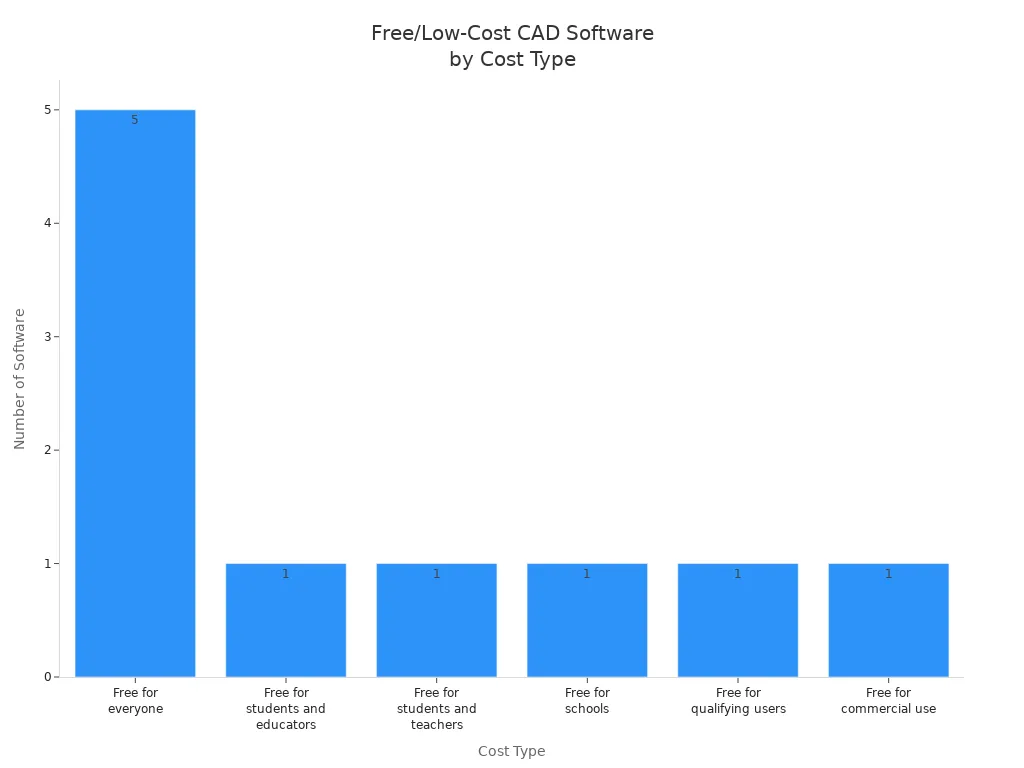
Open-Source-Software bietet kleinen Unternehmen und Studenten die Möglichkeit, Geld zu sparen und ihre 3D-Druckprozesse aufzuwerten.
Hohlmodelle zum Einsparen von Filament
Aushöhlen von 3D-Modellen ist eine bewährte Methode, um die Kosten des 3D-Drucks zu senken. Diese Konstruktionstechnik reduziert den Filamentverbrauch und sorgt für ein stabiles Bauteil. Viele Anwender berichten, dass Hohlmodelle weniger Material benötigen und die Kosten senken, ohne die Qualität zu beeinträchtigen. Gitterstrukturen im Inneren des Modells können ebenfalls hilfreich sein. Diese Konstruktionsaspekte haben einen großen Einfluss auf die Gesamtkosten eines 3D-Drucks. project.Tip: Hohlmodelle eignen sich am besten für nichttragende Teile oder Ausstellungsstücke.
De
Schild für Weniger Unterstützungen
Gutes Design kann den Bedarf an Unterstützung verringern, Das senkt Kosten und spart Zeit. Designer sollten wichtige Details mit dem Druckbett ausrichten und den Kontakt zum Druckbett maximieren. Abgeschrägte Überhänge und sanfte Übergänge helfen, zusätzliche Stützstrukturen zu vermeiden. Weniger Stützstrukturen bedeuten weniger Materialverbrauch, weniger Nachbearbeitungsschritte und geringere Kosten.
- Komplexe 3D-Modelle Oftmals werden mehr Stützstrukturen benötigt, was die Kosten des 3D-Drucks erhöht.
- Einfache Formen und eine intelligente Anordnung helfen, Geld zu sparen und die Effizienz zu steigern.
Sorgfältige Designentscheidungen führen zu besseren Ergebnissen und einem höheren Wert jedes 3D-Drucks.
Arbeitsabläufe und Wartung zur Kostenreduzierung
Fehlerhafte Drucke effizient beheben
Fehldrucke können die Kosten schnell in die Höhe treiben. Durch die Identifizierung der häufigsten Ursachen, wie z. B. mangelhafte Modellvorbereitung, falsche Maschineneinstellungen oder instabile Bauplatten, lassen sich diese Probleme beheben. Schnelles Handeln hilft, Abfall zu reduzieren und Kosten zu sparen. Zu den effektiven Methoden gehören:
- Problembereiche isolieren, wie tiefe Hohlräume oder steile Überhänge, um den Stützbedarf zu reduzieren.
- Durch Hinzufügen von Ausrichtungselementen wie Schnappverbindungen oder Laschen zur Verbesserung der strukturellen Festigkeit.
- Durch die Verwendung größerer Untergründe wird der Kontakt zwischen Bett und Unterkonstruktion vergrößert, um Verformungen zu vermeiden.
- Um hohe, schmale Bauteile zu vermeiden, werden breitere Sockel verwendet, um die Stabilität zu gewährleisten.
- Optimierung der Wandstärke zur Verstärkung von Schwachstellen.
Auch misslungene Drucke können wiederverwendet werden. Beispielsweise schafft die Umwandlung von Abfall in recyceltes Filament, die Herstellung von Kunstwerken oder die Verwendung von Resten als Werkzeuge Mehrwert und senkt die Kosten.
Max Filamentverbrauch reduzieren
Tipp: Sortieren Sie die Filamentspulen nach Farbe und Typ, um den Verbrauch zu verfolgen und unnötige Käufe zu vermeiden.
Warten Sie Ihren 3D-Drucker
Regelmäßige Wartung Verhindert Ausfälle und verlängert die Lebensdauer von 3D-Druckern. Einfache, tägliche und wöchentliche Maßnahmen können Geld sparen und die langfristigen Kosten senken. Die folgende Tabelle zeigt allgemeine Wartungsarbeiten und ihre Vorteile:
| Wartungsaufgabe | Frequenz | Geschätzte Kosteneinsparungen |
|---|---|---|
| Tägliche Düsenreinigung | Täglich | Verhindert kostspielige Reparaturen |
| Schmieren der beweglichen Teile | Wöchentlich | Verlängert die Lebensdauer, reduziert Ausfallzeiten |
| Riemenspannung | Monatlich | Vermeidet teure Ersatzbeschaffungen |
| Reinigung der Bauplatte | Wöchentlich | Gewährleistet hochwertige Ausdrucke |
Eine Studie zeigt, dass ordnungsgemäße Wartung Verlängert die Lebensdauer des Druckers um bis zu 30 %. Diese Gewohnheiten helfen den Nutzern, teure Reparaturen zu vermeiden und ihre 3D-Druckprojekte reibungslos am Laufen zu halten.
Zusätzliche Tipps zum Geldsparen beim 3D-Druck
Drucke wiederverwenden und umfunktionieren
Viele Anwender stellen fest, dass die Wiederverwendung und das Upcycling von fehlgeschlagenen oder veralteten 3D-Drucken zu erheblichen Kosteneinsparungen führen. Mithilfe eines Filament-Recyclingsystems können sie aus alten Drucken neues Filament gewinnen und so die Materialkosten senken. Manche mischen fehlgeschlagene ABS-Drucke mit Aceton, um nützliche Klebstoffe oder Suspensionen herzustellen. Andere schmelzen Reste ein, um neue Gegenstände wie Untersetzer oder Schlüsselanhänger zu fertigen. Lehrkräfte nutzen fehlgeschlagene Drucke oft als Lehrmittel für Anfänger. Ist eine Upcycling-Lösung nicht möglich, können Recyclingdienste dazu beitragen, Abfall von Deponien fernzuhalten. Diese Praktiken senken nicht nur die Kosten, sondern fördern auch eine Kreislaufwirtschaft.Stand 2019 Nur 9 % des Plastikmülls wurden recycelt., Daher schafft jede Anstrengung zur Wiederverwendung von 3D-Materialien Mehrwert und reduziert die Umweltbelastung.
Digitales Inventar berücksichtigen
Ein digitales Inventar von 3D-Modellen hilft Nutzern, unnötige physische Lagerung zu vermeiden und Kosten zu senken. Teile werden nur bei Bedarf hergestellt, Unternehmen reduzieren Materialverschwendung und Lagerenergie. Dieser Just-in-Time-Ansatz verhindert Überproduktion und senkt das Risiko ungenutzter Teilebestände. Branchen wie Luft- und Raumfahrt, Gesundheitswesen und Verteidigung nutzen digitale Lagerbestände, um Effizienz und Nachhaltigkeit zu verbessern. Dezentrale Produktion ebenfalls. reduziert Transportemissionen und Verpackungsmüll, was die Kosteneinsparungen weiter erhöht.
Arbeitsaufwand und Zeit berücksichtigen
Die Berücksichtigung von Arbeitsaufwand und Zeit kann die Gesamtkosten von 3D-Druckprojekten erheblich beeinflussen. Die Integration von Automatisierung und Robotik in 3D-Prozesse kann Verkürzung der Projektlaufzeiten um bis zu 60 % und die Lohnkosten um bis zu 80 %.
Branchenexperten heben drei Top-Tipps zum Geldsparen hervor:
- Dezentralisierung der Lieferketten
- Schnelle Prototypenerstellung im eigenen Haus
- Reduzierung von Lagerbeständen und Abfall
Viele Unternehmen berichten von erheblichen Einsparungen. Volkswagen Autoeuropa beispielsweise senkte die Kosten um 475.000 € in zwei Jahren. Kleine Änderungen bei Materialien, Einstellungen und Arbeitsabläufen können die Kosten des 3D-Drucks senken.
Teilen Sie Ihre eigenen Sparstrategien und helfen Sie anderen!
Häufig gestellte Fragen
Welches ist das günstigste Filament für den 3D-Druck?
PLA ist in der Regel am günstigsten und eignet sich gut für die meisten Projekte. Viele Anwender entscheiden sich aufgrund des niedrigen Preises und der einfachen Druckbarkeit für PLA.
Wie kann man die Verschwendung von Filament vermeiden?
Er oder sie sollte die Druckereinstellungen vor jedem Druckauftrag überprüfen. Tests mit kleinen Modellen helfen, Fehler frühzeitig zu erkennen. Sorgfältige Planung reduziert Ausschuss.
Spart regelmäßige Wartung wirklich Geld?
Ja. Regelmäßige Wartung beugt Ausfällen vor. Sie sorgt für einen reibungslosen Betrieb des Druckers. Diese Gewohnheit senkt die Reparaturkosten und verlängert die Lebensdauer des Druckers.
