





Owning a 3d printer often proves worth it for people who enjoy hands-on projects and want to create or repair items at home. Many users buy a 3d printer to replace broken parts or make custom prototypes for personal use. The following chart shows the main reasons people choose 3d printing:
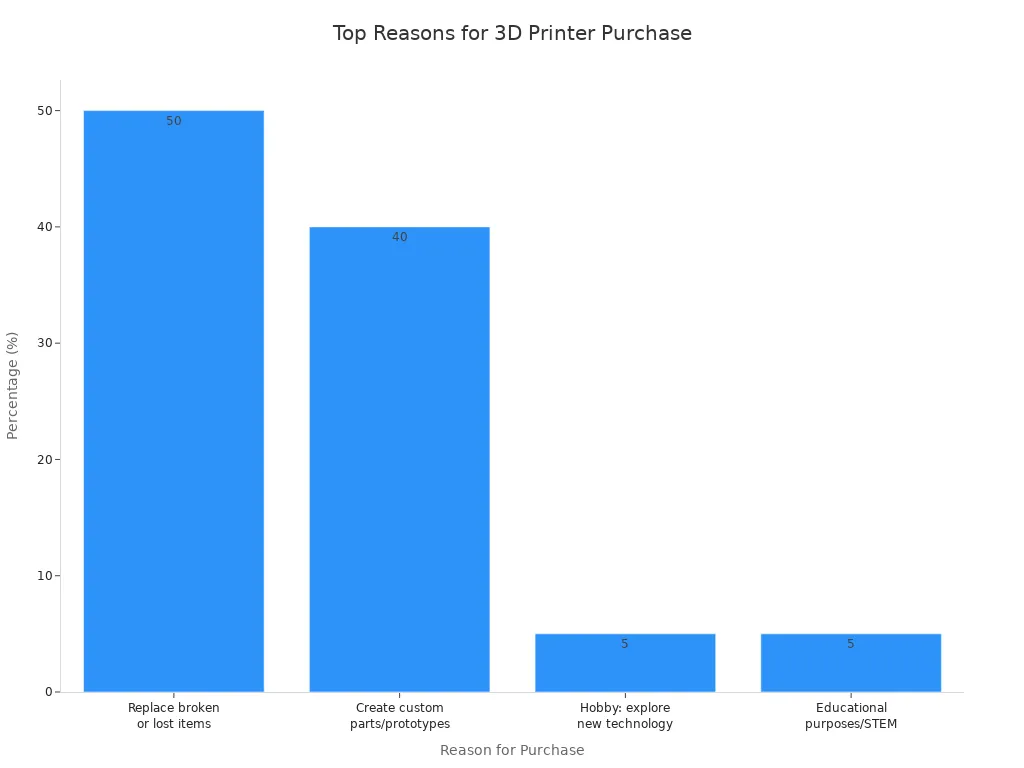
A 3d printer offers several benefits, but success depends on how often someone uses it and their interest in learning 3d design and maintenance. Each person should consider their own needs before deciding.
Key Takeaways
- 3D printers are most valuable for creators and hobbyists who enjoy hands-on projects and customization.
- Occasional users may find 3D printing less worthwhile due to challenges like maintenance and learning curves.
- Regular maintenance and learning about 3D printing can enhance the user experience and improve print quality.
- Choosing the right 3D printer model is crucial for reliability and satisfaction; consider features and community support.
- 3D printing can save money and reduce waste by allowing users to create or repair items at home.
Who Gets the Most from a 3D Printer?
Creators and Hobbyists
A 3d printer offers the most value to creators, hobbyists, and frequent users who enjoy hands-on work and customization. These individuals often seek new ways to solve problems, express creativity, or start small businesses. They use 3d printing for a wide range of projects, from home improvement to prototyping. The key advantages of owning a 3d printer for these users include flexibility, rapid design changes, and the ability to make unique items.
Many creators and hobbyists benefit from 3d printing in the following ways:
- Board game enthusiasts design custom inserts and components to enhance their games.
- Crafters and DIYers make personalized tools and organizers for their hobbies.
- Entrepreneurs launch small businesses by selling custom items like cookie cutters and game pieces.
- Home improvers print replacement parts and custom organizers to solve everyday problems.
Note: A Reddit user started by making cookie cutters for family events. The demand grew, and they opened an online shop. Many hobbyists print custom holders for tools and cable organizers to improve home organization. Some create refillable soap dispensers to reduce plastic waste.
The table below shows how creators and hobbyists use 3d printers for personal and professional projects:
|
Application Type |
Description |
|---|---|
|
Custom Tools and Organizers |
Hobbyists create custom parts and organizers to solve everyday problems. |
|
Home Organization |
Items like cable holders and drawer dividers improve home organization. |
|
Profit Generation |
Many hobbyists start by making items for personal use and then sell them. |
|
Community Support |
Entrepreneurs join online groups for advice on marketing and feedback. |
These examples show the benefits and advantages of 3d printing for those who enjoy creativity and customization. The ability to design, print, and test ideas quickly makes 3d printers a powerful tool for innovation and prototyping.
Occasional Users
Occasional users may not find a 3d printer as worth it. They often print only a few items each year or use the machine for simple tasks. Many casual users face challenges that reduce the value of owning a 3d printer.
Common issues for occasional users include:
- Problems with print adhesion, often caused by a dirty build plate or incorrect print profiles.
- Difficulty understanding printer settings, which leads to frustration.
- Overlooking the need for maintenance and preparation before printing.
These challenges can make 3d printing less enjoyable for those who do not want to spend time learning or troubleshooting. For occasional users, the time and effort required may outweigh the benefits. They may find it easier to order printed items from online services instead of owning a 3d printer.
Tip: People who want to use 3d printing for quick, one-time projects should consider their willingness to learn and maintain the machine. A 3d printer brings the most value to those who enjoy regular use and hands-on engagement.
3D Printer Learning Curve and Time
Getting Started with 3D Printing
Learning to operate a 3d printer takes time and patience. Beginners often start by exploring basic concepts of 3d printing, such as how a printer works and what materials it uses. Many new users turn to online resources for help. Some of the most popular learning tools include:
- 3D Printing Basics, which explains the essentials of the process.
- SketchUp, a simple CAD program for designing models.
- OpenSCAD, a tool for creating customizable 3d objects through programming.
- Blender, which helps with artistic and complex shapes.
- 3Ders.org and 3Dprinter.net, which provide news and guides.
- 3dPrintHQ.com, a glossary for understanding printing terms.
- The 3D Printing SubReddit, where users share questions and advice.
Most people need several hours to set up their first print. They must learn how to slice a model, level the print bed, and adjust settings. Mistakes happen often, but each failure teaches something new. Commitment and curiosity help users overcome early challenges.
Tip: Beginners who enjoy hands-on learning and problem-solving will find the process more rewarding.
Maintenance and Upkeep
A 3d printer requires regular care to keep it running smoothly. Owners must check for common issues, such as clogs, layer shifting, and warping. These problems can result from poor calibration or incorrect temperature settings. Mechanical misalignment often causes stringing and excessive noise.
The table below lists frequent maintenance issues and their causes:
|
Maintenance Issue |
Common Causes |
|---|---|
|
Clogs |
Mechanical misalignment |
|
Layer shifting |
Poor calibration |
|
Warping |
Incorrect temperature |
|
Stringing |
Mechanical misalignment |
|
Inconsistent extrusion |
Poor calibration |
|
Excessive noise |
Mechanical misalignment |
Users should also check belt tension and clean the print bed. Regular upkeep prevents bigger problems and extends the life of the printer. People who enjoy tinkering will find maintenance part of the fun. Those who want a "set it and forget it" experience may feel frustrated by the ongoing work.
Is 3D Printing Worth It for Reliability?
Common Issues and Fixes
Reliability matters when people consider buying a 3d printer. Most consumer printers complete about 93% of prints successfully, with an average failure rate of 7%. In about 19% of cases, users need to step in, but these do not always end in failure. Many common problems have simple solutions. For example, messy surfaces or "spider nets" often result from a lack of support. Adding support can fix this issue. Separated layers may mean the temperature is too low, so increasing the head temperature helps. Clogged print heads cause inconsistent extrusion or no filament coming out. Unclogging the printer solves these problems.
Other frequent issues include:
- Prints not sticking to the bed, which leveling the print bed can fix.
- Warping or edges lifting off, often solved by raising the bed temperature.
- Stringing or hairy prints, which adjusting retraction settings can reduce.
- Shifted layers, usually caused by slicing errors, require reslicing the object.
People who enjoy prototyping or early-phase prototyping find that learning these fixes leads to better results and more reliable printing.
Choosing the Right Model
Selecting the right 3d printer model improves reliability and user satisfaction. Some models stand out for their strong performance and support. The table below compares popular 3d printer models and their reliability ratings:
|
3D Printer Model |
Reliability Rating |
Key Features |
|---|---|---|
|
Ultimaker S5 |
High |
Precision, versatility, robust build quality |
|
Prusa i3 MK3S+ |
High |
Open-source design, affordability, impressive print quality |
|
Bambu Lab P1S |
Moderate-High |
Advanced features, affordability |
|
Elegoo Neptune 4 Max |
Moderate |
Cost-efficient, large build volume |
|
Bambu Lab X1 Carbon |
High |
Advanced technology, high-speed capabilities |
|
Creality Ender 3 S1 Pro |
Moderate |
Reliable, user-friendly |
Models like the Prusa i3 MK3S+ and Ultimaker S5 receive high marks for reliability. Brands with strong user communities and high customer satisfaction scores often provide better support. Reading reviews helps buyers learn about print quality, ease of use, and reliability. People who want to use 3d printing for rapid design iteration or to create a functional prototype should choose a model with a good reputation. Reliable printers make printing smoother and help users succeed with their 3d projects.
Community Support for 3D Printing
Online Resources
Many people find that strong community support makes learning about 3d printing easier. Online forums and groups help users solve problems and share ideas. These communities offer advice for beginners and experts. The table below shows some of the largest online communities for 3d support:
|
Community/Forum Name |
Description |
|---|---|
|
|
Preferred for discussions resembling typical forums. |
|
Discord |
Good for quick answers but not ideal for in-depth discussions. |
|
Prusa Forum |
Focused on Prusa printers, providing specific support. |
|
RepRap Forums |
Discusses experimentation and technical aspects, though declining in activity. |
|
Klipper Discourse |
Specialized discussions about Klipper, helpful for troubleshooting. |
People join these groups to ask questions, share their 3d projects, and get feedback. The 3D Printing Community of Practice gives users a place to learn best practices. Members often show their work and take part in brainstorming sessions. These activities help users fix problems and improve their skills.
Tip: New users can find answers to most 3d printer issues by searching or posting in these forums.
Local Groups and Maker Spaces
Local groups and maker spaces give hands-on help for 3d printer owners. Many cities have spaces where people can use 3d printers, learn new skills, and meet others with similar interests. Maker spaces often provide training, mini courses, and project guidance. The table below lists common types of support found in these spaces:
|
Type of Support/Resource |
Description |
|---|---|
|
Training |
Learning platform assists in training staff and teaching members to design and create products. |
|
Mini Courses |
Informative video content and tutorials to build foundational knowledge in 3d printing and design software. |
|
Project Guidance |
Guides through the design process for specific products, including tutorials and templates. |
|
Challenges |
Live briefs for designing solutions for real organizations, allowing creative freedom. |
People who join local groups can get help with their 3d printer, learn about 3d design, and take part in group projects. These spaces encourage teamwork and creativity. Many users find that local support helps them solve problems faster and learn more about 3d printing.
Environmental Impact of 3D Printing
Material Waste and Recycling
3d printing can create a significant amount of plastic waste if users do not manage it carefully. In the UK alone, filament-based 3d printing generates about 379,000 kg of plastic waste each year. Failed prints, support structures, and leftover filament often end up in the trash. People who use a 3d printer regularly should consider ways to reduce this waste.
Sustainable practices help limit the environmental impact of 3d projects:
- Choose sustainable materials like Polylactic Acid (PLA), which is compostable and reduces plastic pollution.
- Optimize designs to use less raw material and energy.
- Recycle waste material by shredding and reusing failed prints or excess filament.
- Print multiple components at once to improve efficiency and reduce energy use.
- Focus on essential and multipurpose items to avoid unnecessary production.
These steps help users make 3d printing more eco-friendly. Many hobbyists now look for ways to recycle or reuse materials in their 3d projects.
Energy Use
A typical desktop 3d printer uses between 50 and 300 watts per hour. The cost to run one is about $0.008 to $0.05 per hour, which is lower than most household appliances. However, 3d printing can use more energy per unit mass than traditional manufacturing methods like injection molding. Additive manufacturing machines often have higher energy consumption and CO2 emissions because they build objects slowly and may need more machines for the same output.
Some 3d printing processes, especially those using lasers, can use 50 to 100 times more electricity than traditional methods. Using renewable energy sources can help reduce the carbon footprint of 3d projects. People who care about sustainability should consider both material waste and energy use when deciding how to use their 3d printer.
Practical Limits of 3D Printing
Print Quality and Size
Home 3d printers have made great progress, but they still face limits in print quality and size. Most consumer models cannot match the finish or detail of industrial machines. Users often see issues like rough surfaces, visible layer lines, or small gaps in their prints. Common problems include insufficient extrusion, low bonding strength, and warping. These issues can affect the strength and look of finished objects.
The table below shows some of the most frequent print quality problems:
|
Issue |
Description |
|---|---|
|
Insufficient extrusion |
Gaps between layers from poor filament flow or nozzle clogs. |
|
Low bonding strength |
Weak parts that break easily, often fixed by changing infill or wall loops. |
|
Excessive cooling |
Poor layer adhesion from high fan speed or low temperature. |
|
Gaps in the top layer |
Overflow or gaps caused by wrong flow rate settings. |
|
Clogs |
Blocked extruders or nozzles that need cleaning. |
|
Warping |
Edges lifting due to shrinkage or poor bed adhesion. |
Print size also matters. Most home 3d printers have a limited build volume. Large models must be printed in sections and joined later. The table below compares the maximum print sizes of popular models in 2024:
|
Model |
Maximum Print Size (mm) |
Resolution (px) |
|---|---|---|
|
Creality K1 Max |
450 x 450 x 470 |
N/A |
|
Ender-3 V3 Plus |
300 to 330 |
N/A |
|
Creality HALOT-MAGE S |
N/A |
13320 x 5120 |
People who want to print large or highly detailed objects should check these limits before buying a 3d printer.
Space and Noise
A 3d printer needs a safe and suitable space for operation. Users should place the machine in a well-ventilated area. Experts recommend 5-10 fresh air changes per hour. One printer fits best in a standard office space of about 150 square feet. Good airflow helps remove fumes and keeps the workspace safe.
Noise is another factor to consider. Most desktop 3d printers produce sound levels about 12 decibels above background noise during operation. This noise can be distracting in quiet rooms or shared spaces. People who value a quiet environment may want to set up their 3d printer in a separate room.
Tip: Planning for space and noise helps users enjoy 3d printing without disrupting daily life.
Benefits of 3D Printing at Home
Customization and Unique Projects
A 3d printer gives people the power to create items that fit their exact needs. Many home users enjoy making personalized storage solutions, such as pencil holders, jewelry racks, and custom-sized containers. They design unique key holders and video game cartridge organizers that match their style. Some even build entire shelves or shelf brackets for special spaces in their homes. These projects often solve problems that store-bought items cannot fix.
People also use 3d printing for everyday tools. Toothpaste squeezers and custom filament storage solutions help make daily life easier. The ability to design and print replacement parts means users can fix broken items instead of throwing them away. This approach saves money and reduces waste. Home users find that customization leads to more independence and convenience.
Owning a 3d printer can provide you with more independence, money saving opportunities, educational value, creative outlets, and convenience right in your own home.
Learning and Exploration
3d printing opens the door to learning new skills. Many families use a 3d printer to teach kids about science, technology, engineering, and math. Children learn how to design 3d models and solve problems through hands-on projects. This process builds creativity and analytical thinking.
Adults also benefit from exploring 3d design and prototyping. They discover how to turn ideas into real objects. Many users enjoy the fun hobby of making arts and crafts or gifts for friends. The sense of immediate satisfaction encourages them to try new things and keep learning.
Some of the most significant benefits reported by home users include:
- Customized solutions for unique needs
- Saving money by making or repairing items
- Fun hobby and creative outlet
- Teaching kids STEM skills
- Making home improvements
- Low waste manufacturing
- Printing gifts and products to sell
The possibilities with 3d printing are almost endless. People can start with simple projects and move on to more advanced designs as their skills grow.
Buying a 3D Printer: What to Know
Cost vs. Value
People often wonder if buying a 3d printer is a smart investment. The answer depends on the full cost picture and the value it brings to daily life. Entry-level printers start at $200, while advanced models can cost over $1,000. The table below shows the typical price ranges for different types of 3d printers in 2024:
|
Category |
Price Range |
|---|---|
|
Entry-Level Printers |
$200 |
|
Mid-Range Printers |
$200 - $500 |
|
Advanced Printers |
$500 - $1000 |
|
High-End Printers |
> $1000 |
Some hobbyist printers cost between $400 and $1,000. Professional desktop machines usually cost more but offer better print quality and reliability. People should also consider the cost of filament, replacement parts, and regular maintenance. These extra expenses add up over time and affect cost-effectiveness.
A 3d printer can provide great value for those who use it often. Printing custom parts, tools, or gifts at home saves money and time. For people who print only a few items each year, the investment may not pay off. They might find online printing services more cost-effective.
Tip: Always include the cost of materials and upkeep when deciding if a 3d printer fits your budget.
How to Choose
Choosing the right 3d printer involves more than just looking at price tags. People should compare models based on features, safety, and support. Some important factors include:
- Auto-calibration and easy filament loading for a smoother experience
- User-friendly software with free updates
- Safety features like enclosed chambers and automatic nozzle cooling, especially for homes with children
- Effective filtration systems to reduce fumes and particles
- Comprehensive warranties that cover parts and labor
People should also check if the printer design allows for easy maintenance. Regular cleaning and lubrication keep prints consistent and extend the printer’s life. Engaging with online communities helps users solve problems and learn new tips. Popular models often have large support networks, which makes troubleshooting easier.
Note: A good 3d printer matches the user’s needs, space, and skill level. Reading reviews and joining forums can help buyers make informed choices.
A 3d printer offers true value of a 3d printer to those who enjoy creativity and hands-on projects. People who commit to learning and regular use see long-term benefits and immediate benefits. The cost and investment may seem high, but long-term value grows with frequent 3d projects. Readers should weigh the value against their needs and goals. A 3d printer is most worth it for those who want to explore 3d design and make unique items at home.
Consider if the value and benefits match your expectations before making a decision.
FAQ
How long does it take to learn 3D printing?
Most beginners need a few days to understand the basics. They can print simple objects after a week. Mastering advanced skills takes more time. Practice and online tutorials help users improve faster.
What materials can a home 3D printer use?
Home 3D printers often use PLA, ABS, and PETG filaments. Some machines support flexible or wood-filled filaments. Users should check their printer’s specifications before buying new materials.
Is 3D printing safe for kids?
3D printing can be safe for kids with adult supervision. Parents should keep printers in well-ventilated areas. They should teach children about hot surfaces and moving parts.
Can a 3D printer save money?
A 3D printer saves money for people who print often. They can make replacement parts, tools, or gifts at home. Occasional users may not see big savings.
What should someone do with failed prints or leftover filament?
Tip: Users can recycle failed prints or leftover filament. Some communities offer recycling programs. Others use filament recyclers to create new spools from waste.
