






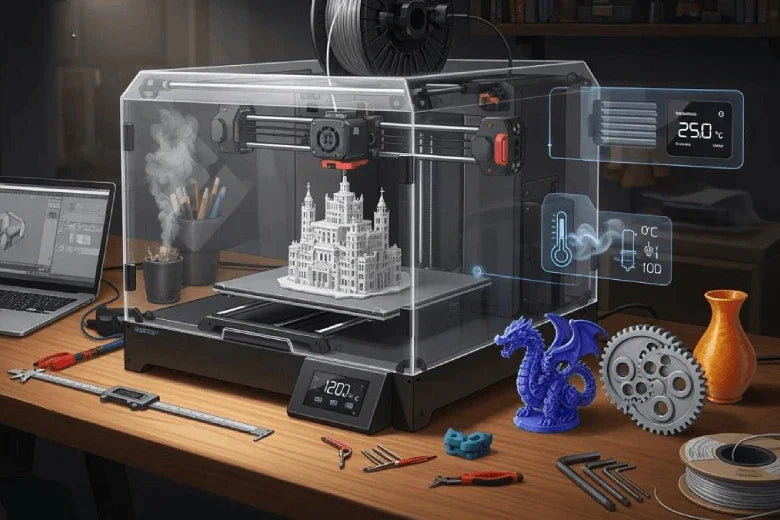
You may wonder if a 3dprinter enclosure fits your setup at home, in the garage, or in a shared space. A stable printing environment plays a key role in both print quality and safety. When you control temperature and airflow, you reduce risks and improve results.
- A stable setup leads to fewer work accidents.
- Lower reliance on manual intervention means fewer safety incidents.
Many users find that a controlled environment helps address common concerns, such as print failures and air quality.
Key Takeaways
- A 3D printer enclosure improves print quality by maintaining a stable temperature and airflow, reducing the risk of warping and print failures.
- Enclosures enhance safety by containing harmful fumes and protecting against dust, making your workspace safer for you and others.
- Consider your printing materials; high-temperature filaments like ABS and polycarbonate benefit significantly from an enclosure, while low-temperature materials like PLA may not require one.
- Building a DIY enclosure can save money and allow customization, but commercial options offer tested safety features and easier assembly.
- Regular maintenance of your enclosure, such as cleaning air filters and checking seals, ensures consistent print quality and prolongs the lifespan of your setup.
When Is a 3DPrinter Enclosure Needed
User Scenarios
You may find a 3dprinter enclosure essential in several situations. If you print at home, you benefit from smoother prints and a safer workspace. In a professional setting, you need fast and accurate results, especially when you handle large jobs or tight deadlines. Industrial users rely on enclosures to use advanced materials and maintain a stable printing environment. This is crucial in fields like aerospace and construction, where precision and reliability matter most.
- Home users: Achieve better print quality and reduce the risk of accidents.
- Professionals: Complete large projects quickly and accurately.
- Industrial users: Maintain temperature control for advanced materials and consistent results.
An enclosure also offers protection from dust and drafts, which can affect your print quality. You gain advantages in safety, especially if you share your workspace with others or have children and pets nearby. The enclosure acts as a barrier, reducing the risk of fire and limiting exposure to emissions from certain filaments.
Printer Types and Materials
The type of printer and filament you use determines if you need an enclosure. Some materials, like ABS, polycarbonate, PEEK, and Ultem, require strict temperature control. ABS, for example, has a high shrinkage rate and warps easily. You need a heated build platform set between 95°C and 110°C, and an enclosure helps maintain this consistent temperature. Polycarbonate and high-performance filaments like PEEK and Ultem demand enclosed chambers for optimal results.
- ABS: Needs a heated bed and enclosure to prevent warping.
- Polycarbonate (PC): Performs best in an enclosed chamber.
- PEEK and Ultem (PEI): Require high-temperature printers with enclosures.
If you use PLA or other low-temperature filaments, you may not need an enclosure. However, you still gain benefits in print consistency and safety.
Environmental Factors
Your printing environment plays a major role in print quality. Temperature fluctuations, humidity, and airflow can all impact your results. An enclosure helps you control these variables, creating a more predictable and stable printing environment.
Tip: Use an enclosure to protect your prints from sudden temperature changes, drafts, and dust. This leads to fewer print failures and higher accuracy.
Here is how different environmental factors affect your prints:
|
Environmental Factor |
Effect on 3D Print Quality |
|---|---|
|
Temperature (20-35°C) |
Increases curing speed and reduces curing time; too high can cause warping. |
|
Low Temperature (<15°C) |
Increases viscosity, hinders flow, and leads to poor adhesion. |
|
High Humidity (>80% RH) |
Causes moisture penetration, weakens layers, and increases viscosity too quickly. |
|
Low Humidity (<30% RH) |
Can lead to rapid curing, increasing internal stress and delamination risk. |
An enclosure creates a buffer against these changes. It keeps the temperature steady, shields your printer from drafts, and blocks dust. This protection ensures your prints come out as designed, with fewer defects and less risk of fire. You also reduce the impact of emissions, making your workspace safer and more comfortable.
Enclosure Benefits for Stable Printing Environment
Temperature and Airflow Control
You need a constant temperature printing environment to achieve consistent results. An enclosure acts as a temperature control system, keeping the heat inside and blocking drafts. This stability helps you avoid sudden cooling, which can cause warping problems and poor layer adhesion. When you print with materials like ABS or ASA, the enclosure maintains internal temperatures between 38°C and 42°C. This range prevents equipment stress and supports optimal print quality.
A recent study shows that controlling airflow around the print site changes how the polymer cools and bonds. When you manage airflow and temperature, you improve the molecular structure and geometric precision of your prints. The enclosure gives you this control, so you get better mechanical properties and higher quality in every part.
Tip: Place your 3dprinter enclosure in a spot with minimal temperature swings. This simple step boosts the stability of your printing environment.
Reduced Warping and Improved Accuracy
Warping can ruin your prints and waste material. You can prevent this by using an enclosure, which keeps the temperature steady and reduces rapid cooling. This protection is especially important for high-performance filaments that need precise temperature control. The enclosure also shields your printer from dust and drafts, which can affect the final design and structural stability of your parts.
You will notice fewer failed prints and more accurate results. The enclosure supports better adhesion between layers, so your models come out with clean lines and strong bonds. High-quality enclosures give you the advantages of improved accuracy and fewer defects, even when you print in challenging environments.
Fume Containment and Safety
Safety features matter when you print with materials that release toxic emissions. An enclosure acts like a fume hood, capturing and containing hazardous fumes, dust, and vapors. This setup directs emissions away from you and anyone else in the workspace. You lower your exposure to harmful particles and reduce the risk of fire.
- Use air filtration systems with your enclosure to trap fine particles and toxic emissions.
- Choose enclosures with adjustable windows or vents for better airflow management.
- For higher-risk materials, select enclosures designed for advanced safety.
Fume hoods and enclosures are standard in labs because they protect users from dangerous emissions. You can bring this level of safety to your own workspace by choosing an enclosure with the right safety features.
Noise and Workspace Organization
A 3dprinter enclosure does more than control temperature and fumes. It also reduces noise, making your workspace more comfortable. You can expect a noise reduction of about 5.5 dB with a standard enclosure. If you add a paver stone under your printer, you can cut another 2.5 dB. This quieter environment helps you focus and keeps shared spaces peaceful.
Enclosures help you organize your workspace. You keep tools, filament, and accessories close by, which streamlines your workflow. The enclosure also acts as a barrier, offering protection from accidental bumps or spills. You gain the advantages of a tidy, efficient, and safe printing area.
Note: A well-designed enclosure not only improves print quality but also enhances safety and organization in your environment.
By using an enclosure, you create a stable printing environment that supports high-quality results, safety, and efficiency. You address the advantages and disadvantages of open-air setups and make your workspace safer and more productive.
Drawbacks and When an Enclosure Is Optional
Cost and Space
You need to consider the financial and spatial impact before adding an enclosure to your 3D printer setup. Enclosed printers require a higher initial investment and take up more room in your workspace. Open frame printers offer a budget-friendly solution and fit easily into smaller areas. The table below highlights the advantages and disadvantages of each option:
|
Feature |
Open Frame Printer |
Enclosed Printer |
|---|---|---|
|
Low (Budget-friendly) |
High (Higher investment) |
|
|
Maintenance |
Easy access to all parts |
More involved; panels to open |
|
Upgradability |
High flexibility |
Limited by enclosure design |
If you have limited space or a tight budget, you may prefer an open-air setup.
Open-Air Printing Pros
Open-air 3D printing provides several advantages for hobbyists and beginners. You can easily fix issues, level the bed, and perform quick maintenance. The open architecture lets you customize your system and experiment with different materials and hardware. You also benefit from better cooling, which is ideal for printing with PLA and helps prevent deformation. You can monitor your prints closely and make immediate adjustments if needed.
- Open architecture enables customization and modification.
- Flexibility in choosing materials and software tools.
- Affordable option due to fewer components.
- Easy access for upgrades and repairs.
- Optimal cooling for PLA and improved visibility.
You may find open-air setups more appealing if you value hands-on control and frequent tinkering.
Maintenance and Accessibility
Maintaining an open-air printer is straightforward. You reach every part quickly, which makes cleaning and repairs simple. Enclosures add complexity, requiring you to remove panels or open doors to access components. This extra step can slow down troubleshooting and upgrades. If you print with materials that do not release toxic fumes or pose a fire risk, you may not need an enclosure. You can focus on ease of use and accessibility instead.
Tip: Choose an open-air setup if you want maximum flexibility and quick access for maintenance.
You should weigh the advantages and disadvantages of both setups before deciding. Your choice depends on your workspace, budget, and printing needs.
How to Build a 3D Printer Enclosure
Essential Features
When you build a 3d printer enclosure, you must focus on features that ensure safety, print quality, and stability. Start with a rigid structure. This gives your setup the strength to support extra components and keeps pets or children safe. Air filtration systems are vital. They remove harmful emissions and particles, using HEPA filters and activated carbon to keep your environment clean. Temperature control matters for both heat retention and cooling. This helps you avoid jams and supports high-quality prints.
- Air filtration systems for removing VOCs and particles
- Temperature control for consistent heat and cooling
- Rigid structure for safety and support
- Proper ventilation to reduce emissions and regulate temperature
- Fire suppression systems for added protection
A well-designed enclosure provides advantages like improved protection, better print quality, and a safer workspace.
DIY vs. Commercial Options
You can build a 3d printer enclosure yourself or buy a commercial model. DIY options let you customize the design and upgrade features as needed. You save money and use materials like acrylic, wood, or metal. Commercial enclosures offer professional finishes, tested safety features, and easy assembly. They often include built-in air filtration and temperature controls.
|
Option |
Cost |
Customization |
Safety Features |
Assembly |
|---|---|---|---|---|
|
DIY |
Low |
High |
Varies |
Moderate |
|
Commercial |
Higher |
Limited |
Reliable |
Easy |
Choose the option that fits your budget, skills, and workspace needs.
Setup and Maintenance Tips
Set up your enclosure in a spot with stable temperature and minimal drafts. Check that all seals are tight to keep heat inside and block dust. Clean air filters regularly and inspect the enclosure for wear. Routine maintenance ensures consistent quality and reduces downtime. Proactive troubleshooting helps you spot issues before they affect your prints. Ongoing optimization lets you upgrade your setup and extend its lifespan.
Tip: Keep a maintenance log to track filter changes, upgrades, and repairs. This helps you maintain a safe and efficient environment.
By following these steps, you create a 3dprinter enclosure that delivers stability, protection, and high-quality results.
You gain several advantages from a 3D printer enclosure, including temperature control, dust protection, and enhanced safety. Review the table below to weigh the pros and cons for your setup:
|
Pros |
Cons |
|---|---|
|
Maintains temperature for technical filaments |
Can limit printer accessibility |
|
Reduces maintenance needs |
Higher cost for professional models |
|
Improves safety features |
DIY options may lack heat resistance |
Consider your workspace, printer type, and materials. If you print in poorly ventilated areas or use high-temperature filaments, investing in an enclosure protects you from harmful emissions and injuries. Choose an enclosure with easy access, transparent windows, and heat-resistant materials for best results.
FAQ
Do you need an enclosure for every 3D printer?
You do not need an enclosure for every printer. If you use PLA or print in a stable environment, you can skip it. Advanced materials and fluctuating temperatures make an enclosure essential.
Can you build a 3D printer enclosure yourself?
You can build your own enclosure using acrylic, wood, or metal. DIY options let you customize features and save money. Commercial models offer tested safety and easier assembly.
How does an enclosure improve safety?
An enclosure contains fumes, shields you from hot surfaces, and reduces fire risks. You protect yourself and others, especially in shared spaces or homes with children and pets.
What maintenance does an enclosure require?
You should clean air filters, check seals, and inspect panels regularly. Routine maintenance keeps your enclosure effective and extends its lifespan. A maintenance log helps you track tasks.
